Zigbee and Matter on the FRITZ!Box: FRITZ!Smart Gateway Tested with Home Assistant
Current FRITZ!Box models such as the 6670 Cable, the 7690 or the 5690 Pro have a Zigbee base of their own, so you no longer need extra hardware for Zigbee devices. Only the 5690 Pro is also a Matter bridge, though, and that is exactly what the route into Home Assistant hinges on.
Because the FRITZ!SmartHome integration polls the FRITZ!Box on a fixed 30-second schedule. For bulbs, plugs and radiator controls that is fine. For sensors meant to trigger something it is not: whatever happens between two polls never arrives at all. The FRITZ!Smart Gateway adds a Matter bridge to the rest of the FRITZ!Box range, and Matter works by subscription rather than by polling.
This article covers both sides: registering Zigbee devices directly on the FRITZ!Box, and adding the FRITZ!Smart Gateway to Home Assistant as a Matter bridge. The test setup: a FRITZ!Box 6670 Cable on FRITZ!OS 8.25, the gateway on FRITZ!OS 8.26, and two identical Zigbee door/window contacts, one on the box and one on the gateway. That made it possible to watch the same sensor through both routes at once and measure the delay (as of 24 August 2026). Two results up front: Home Assistant refuses to add the gateway at first, and the 30-second polling does not just delay state changes, it loses some of them altogether.
The FRITZ!Smart Gateway is a smart home extension from FRITZ! (article number 20003012) that adds Zigbee 3.0 to a FRITZ!Box, connects additional DECT-ULE/HAN-FUN devices and works as a Matter bridge. It connects to the FRITZ!Box over LAN or 2.4 GHz Wi-Fi. It requires a FRITZ!Box with Wi-Fi, a DECT base and FRITZ!OS 7.50 or newer. Price: €69.99 in the FRITZ! shop (regular price €79.99, RRP €109, as of 16 November 2026).
A note on the name: the Berlin manufacturer AVM has been called FRITZ! GmbH since August 2025. The hardware, the support and FRITZ!OS are unchanged – this article therefore calls the company FRITZ! throughout, including where packaging and older interfaces still say AVM.
First things first: what can your FRITZ!Box already do?
Sort this out before you buy anything. FRITZ! now builds a Zigbee base into several FRITZ!Box models. If you own one of those, you do not need the gateway for Zigbee.
But – and this is the catch – having Zigbee on board does not mean speaking Matter. According to the FRITZ! Matter overview, only two devices in the FRITZ! world are currently a Matter bridge: the FRITZ!Box 5690 Pro and the FRITZ!Smart Gateway. On the 5690 Pro, the feature has been part of the regular firmware since FRITZ!OS 8.51, which FRITZ! released for the box on 10 November 2026; before that, Matter was only available there as a beta in the FRITZ! Labor programme. FRITZ! lists Apple Home, Google Home and Amazon Alexa as the Matter platforms for the box.
| Model | Zigbee on board | Matter bridge |
|---|---|---|
| FRITZ!Smart Gateway | yes | yes, shipping |
| FRITZ!Box 5690 Pro | yes | yes, since FRITZ!OS 8.51 |
| FRITZ!Box 7690 | yes | no |
| FRITZ!Box 6670 Cable | yes | no |
| all other FRITZ!Box models | check the product page if in doubt | no |
The Zigbee column is based on Zigbee 3.0 certificates from the Connectivity Standards Alliance and the manufacturer’s product pages; the Matter column on its “Matter mit FRITZ!” page and the 5690 Pro release notes for FRITZ!OS 8.51 (as of 18 November 2026). The table only lists models I have a solid source for – it is deliberately not a complete model overview. Whether your model has Zigbee is stated on its FRITZ! product page under “Smart Home”.
Do you have a Zigbee FRITZ!Box (6670 Cable, 7690, 5690 Pro)? Then register your Zigbee devices directly on the box – the Zigbee radio in there is technically equivalent to the one in the gateway. Only buy the gateway if you want Matter (for Home Assistant, say) or need to run more than 50 smart home devices. The exception: according to FRITZ!, the 5690 Pro has been a Matter bridge itself since FRITZ!OS 8.51.
Do you have an older FRITZ!Box without Zigbee? Then the gateway gets you both at once: Zigbee and the Matter bridge.
Box and gateway share the same Zigbee standard, transmit power, 40-device Zigbee limit and compatibility list. The figures are in the direct comparison further down. The gateway is not the better Zigbee radio – it can do something the box cannot.
Important if you already have Zigbee devices on the box: you do not have to move anything. FRITZ! states explicitly that the bridge passes through FRITZ!, HAN-FUN and Zigbee devices – regardless of whether they are registered on the FRITZ!Box or on the gateway. Both radio cells come together in the same FRITZ! smart home and are managed centrally in the FRITZ!Box interface.
Part 1: registering Zigbee devices directly on the FRITZ!Box
This applies to models with a built-in Zigbee base, in my case the FRITZ!Box 6670 Cable. The good news: you need no extra software and no USB stick – according to the manual, the box is a fully fledged smart home hub for FRITZ! devices, HAN-FUN devices and Zigbee devices.
The three registration methods
How a Zigbee device is registered depends on the manufacturer. FRITZ! names three variants:
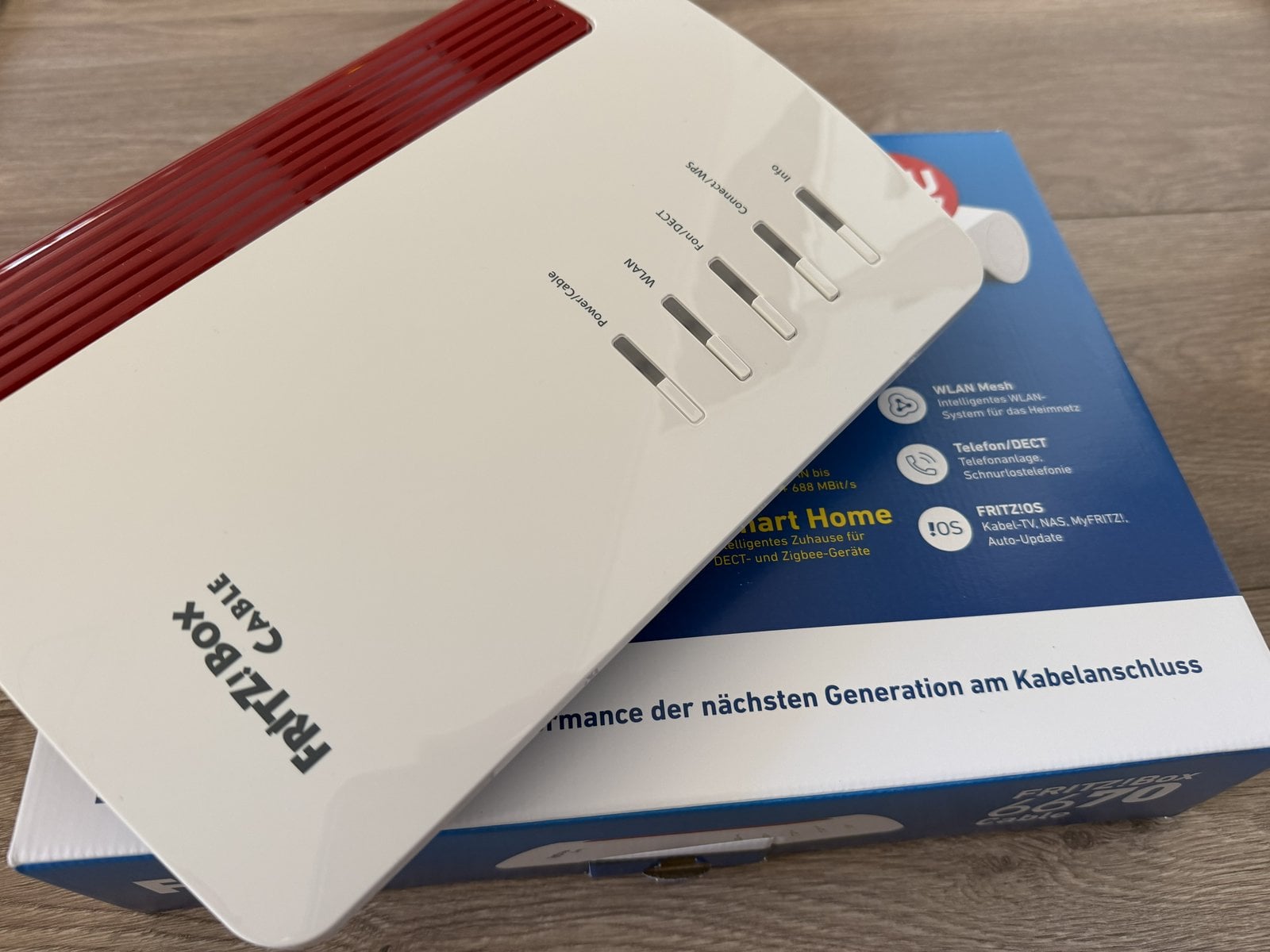
- By button press – the simplest route. On the FRITZ!Box this is the Connect/WPS button. According to the manual it does three things: register Wi-Fi devices via WPS, register cordless handsets – and register smart home devices. So you start pairing mode on the Zigbee device (insert the battery, press a button, depending on the model) and then press Connect/WPS on the box.
- By serial number – typical for Philips Hue bulbs. The handy part: bulbs still paired with a Hue Bridge can be adopted this way without resetting them first. That is what the FRITZ! guide says; with no Hue bulb here I could not reproduce it myself.
- By installation code and MAC address – required for some devices, Bosch for instance. Both are usually printed on the device; the code looks like
1234-5A6B-C7BD-…, the MAC address (or EUI-64) like12AB34CCCDEFFF5A.
Methods 2 and 3 run through the wizard in the web interface: Smart Home → Geräte und Gruppen → Gerät anmelden (Smart Home → Devices and Groups → Register device), or Anderes Smart-Home-Gerät anmelden (Register another smart home device).
How it goes in practice
Here is how it looked for me – I registered a Zigbee door/window contact on the FRITZ!Box 6670 Cable. Start under Smart Home → Geräte und Gruppen. There are two buttons side by side, and the right-hand one is the one you want: “Anderes Smart-Home-Gerät anmelden” for DECT and Zigbee devices from other manufacturers.
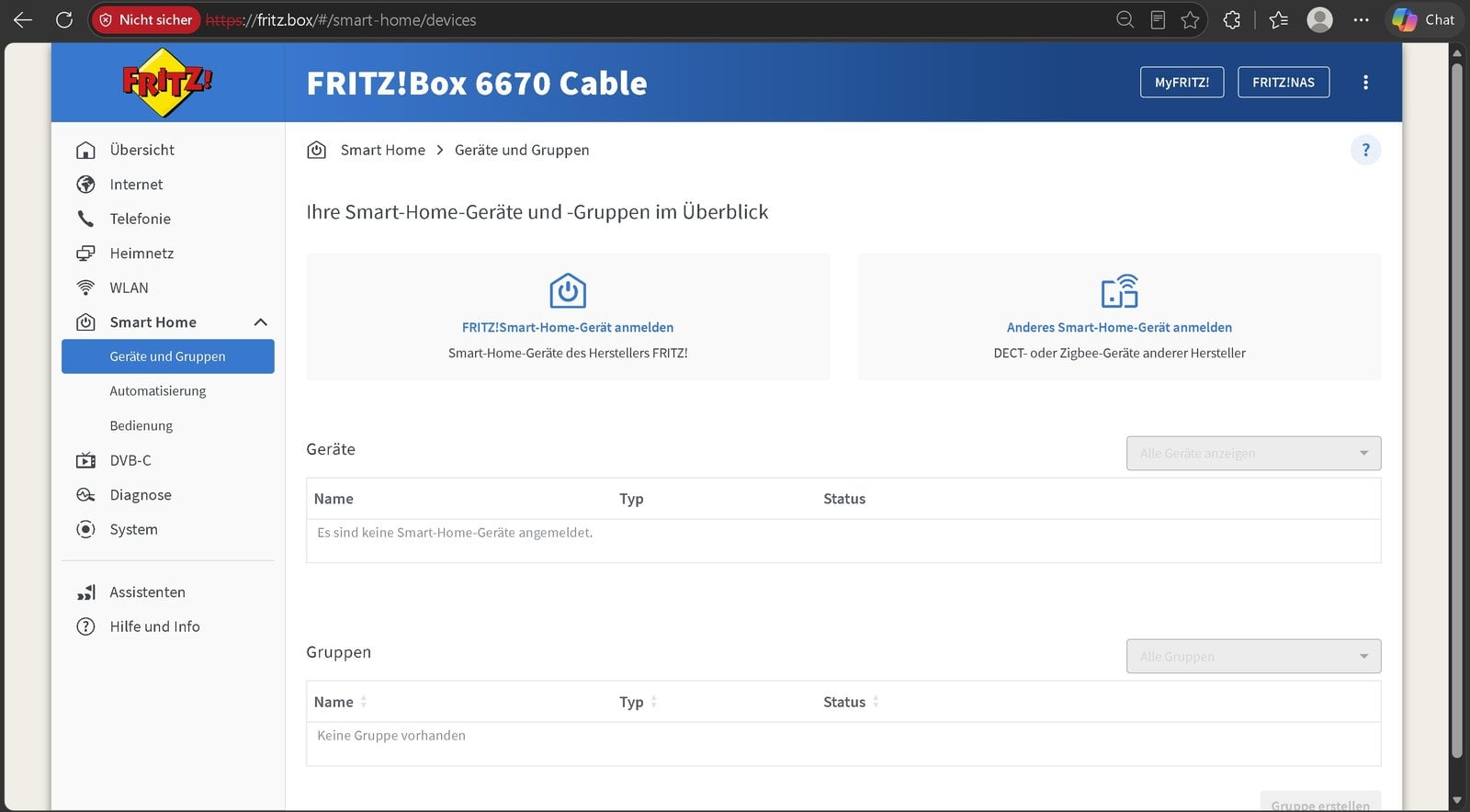
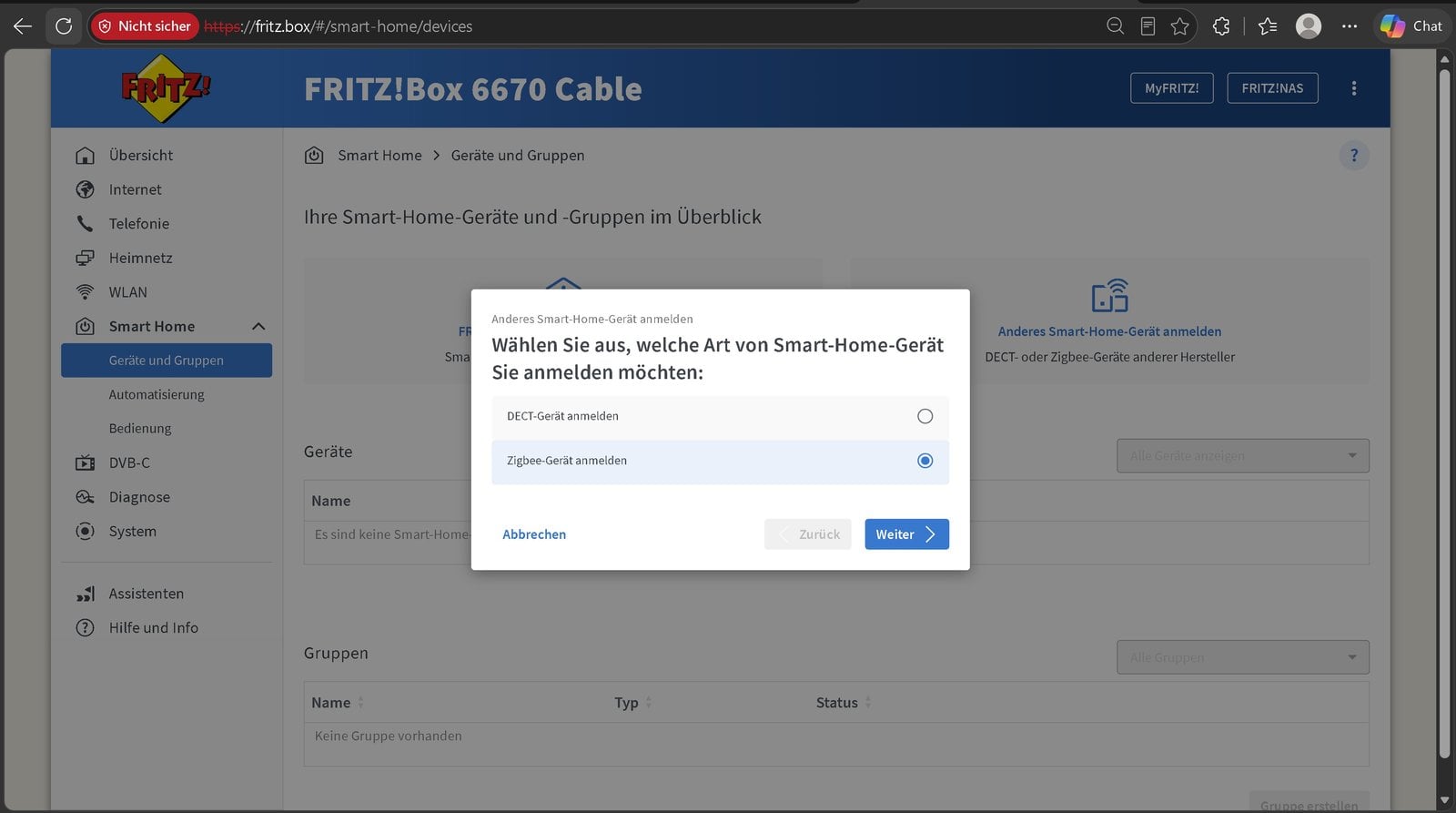
The first step of the wizard asks what kind of device this is – DECT or Zigbee.
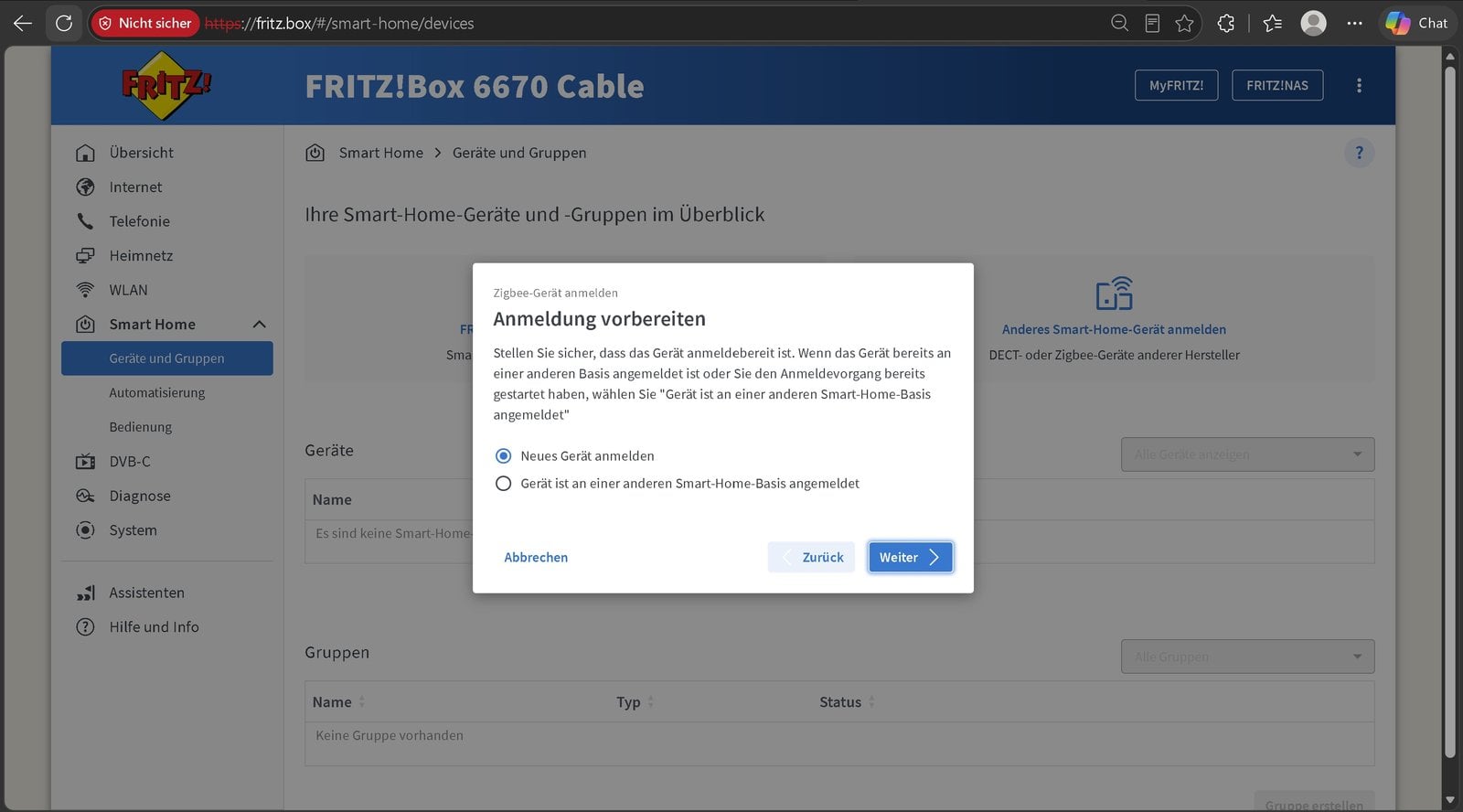
Then comes the point where the takeover wizard mentioned above sits: you can choose between a new device and one that is already registered with another smart home base – a bulb still paired with a Hue Bridge, for example.
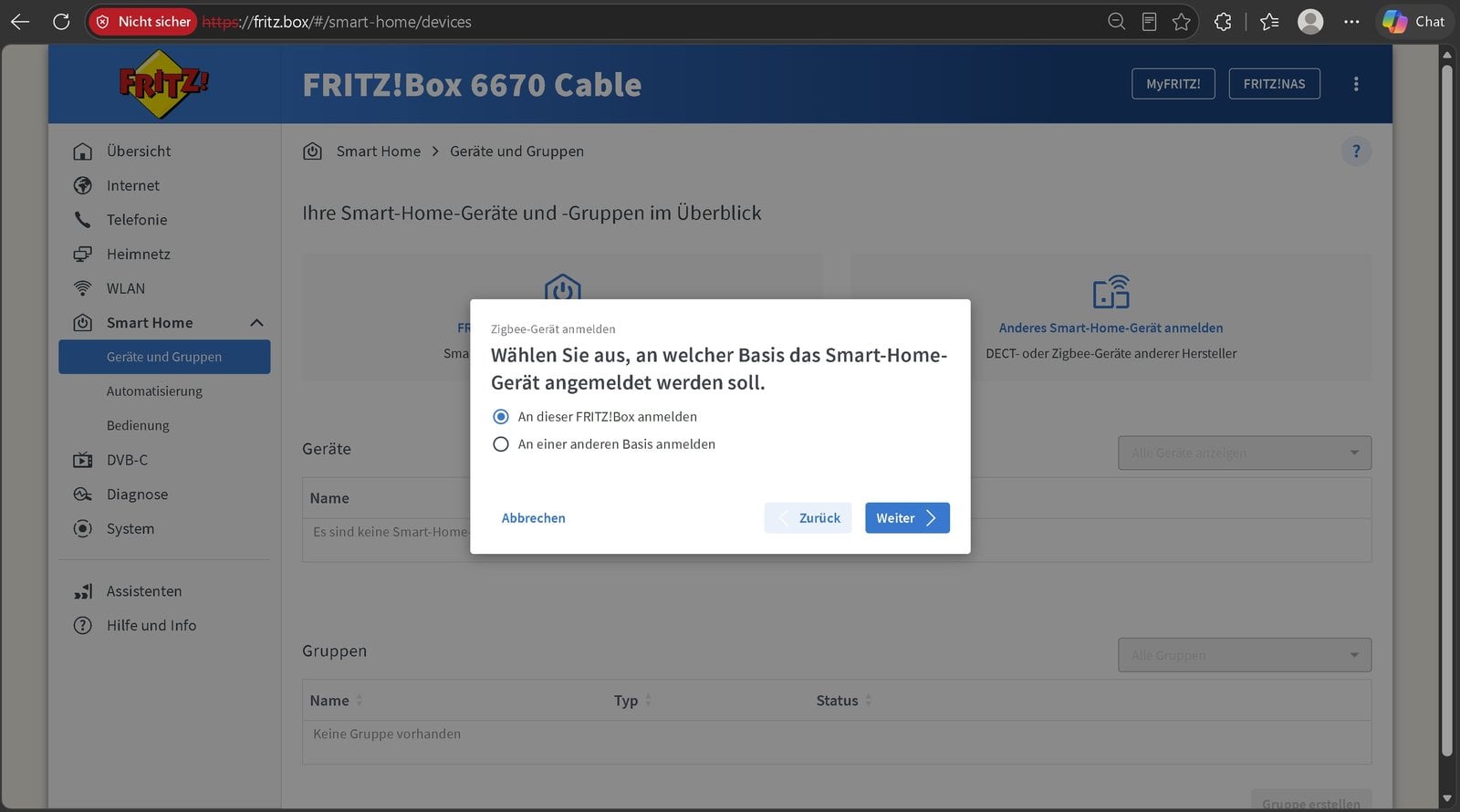
And now it gets interesting for our topic: the FRITZ!Box asks which base the device should end up on. If you have a gateway on the network, this is exactly where you decide whether the device hangs off the box or off the gateway. It makes no difference to how fast Home Assistant sees the device, which I measured. It does make a difference to the device data and to radio range.
After that you put the device into pairing mode, and that is it. My sensor paired on the first attempt.
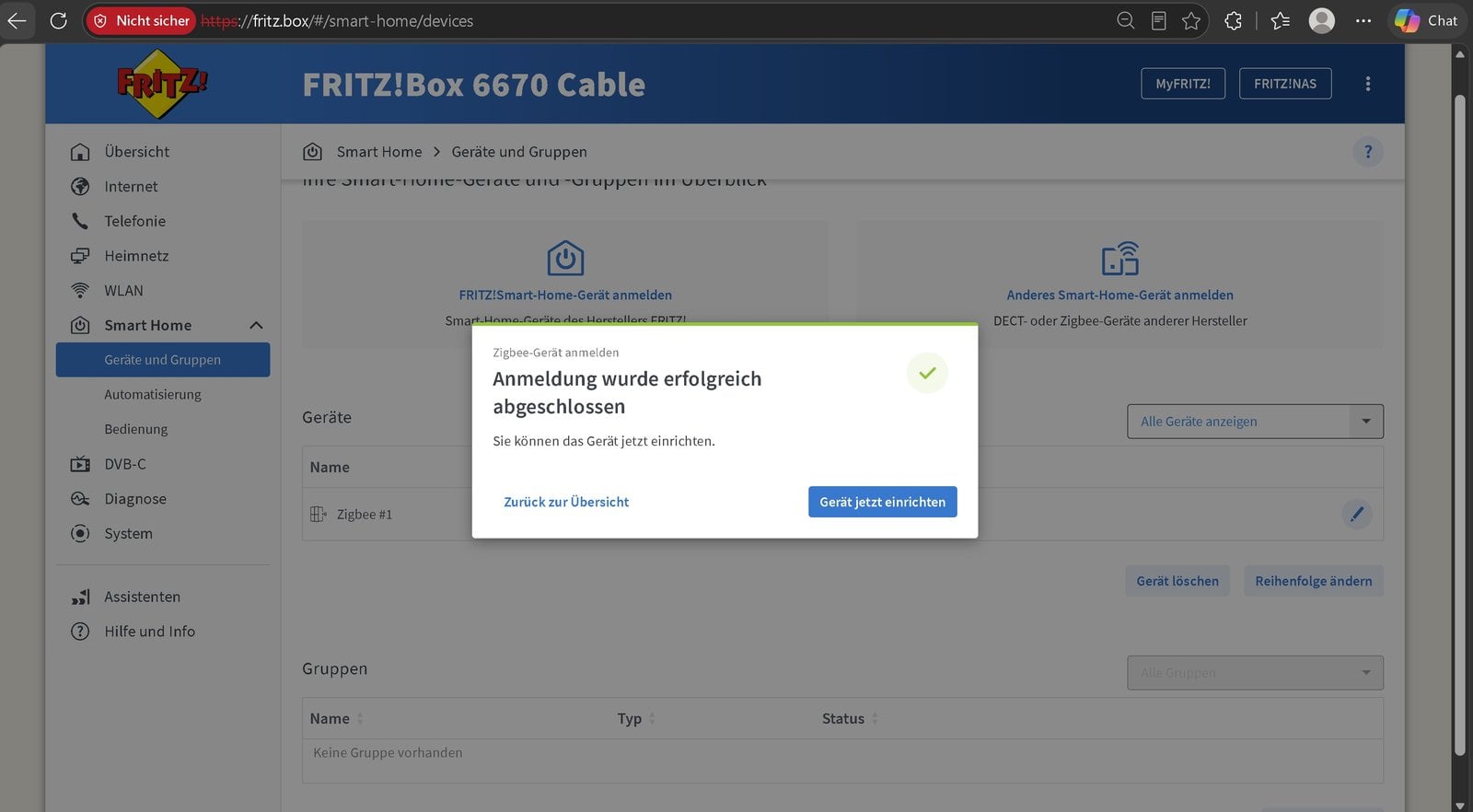
The device profile then shows the model and the connection state. So the FRITZ!Box does know the manufacturer – it just does not name the device after it. The actuator ID is worth noticing too: for Zigbee devices it starts with a Z.
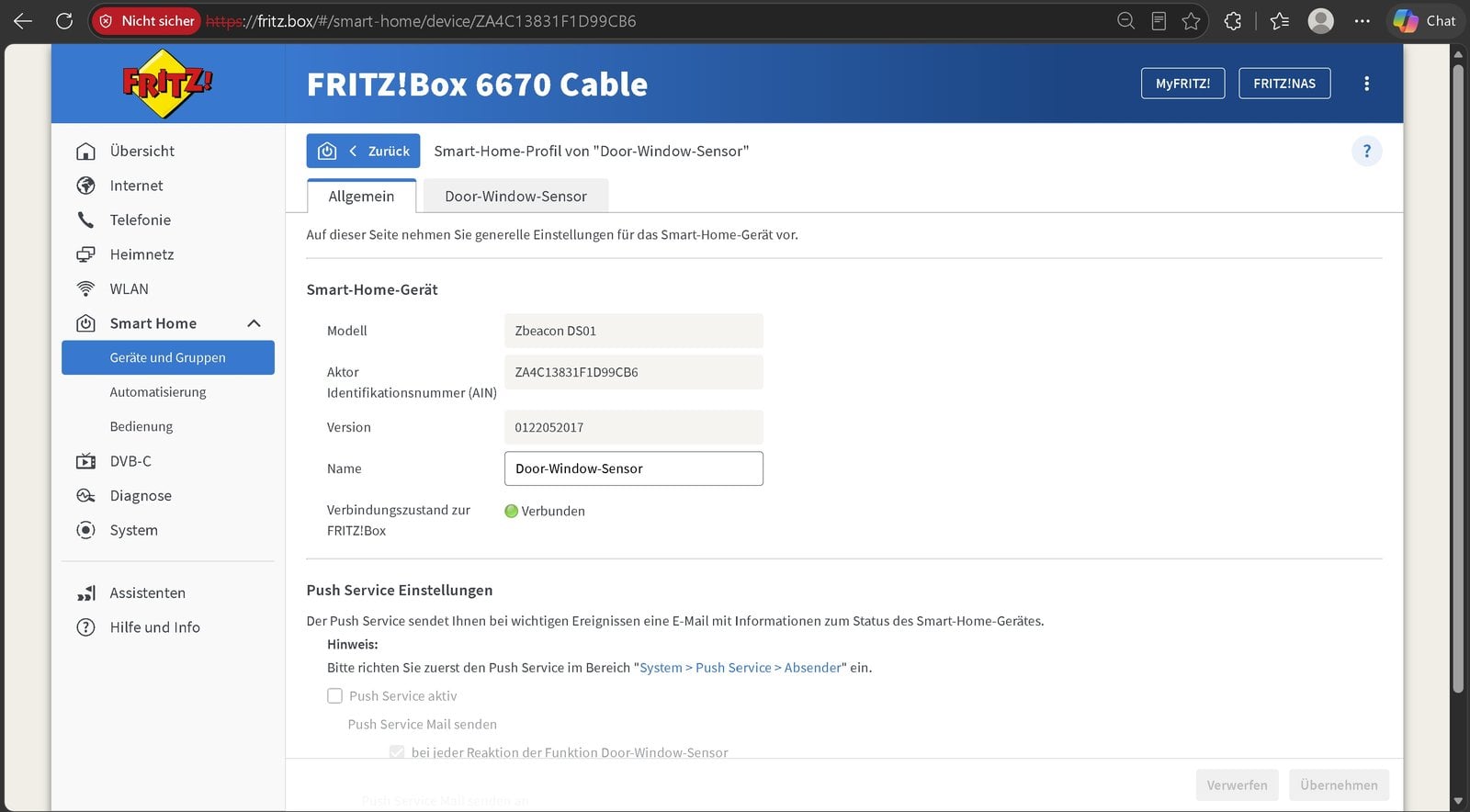
Zigbee #1 – even though the FRITZ!Box knows the manufacturer and model perfectly well and displays both. Register three devices in a row and you end up with three meaningless entries to rename by hand. Remember the order you paired them in, or you will be guessing. And rename them in the FRITZ!Box first, before Home Assistant picks them up – otherwise the placeholder sticks in the entity IDs there.
Once the device is registered and named it behaves like a FRITZ! device: you control it through the web interface, the FRITZ!App Smart Home, a FRITZ!Fon or a FRITZ! button – and you can use it in templates, scenarios and routines together with your FRITZ! devices. According to the manual, Zigbee buttons from other manufacturers can be used as controls too – I had none to try.
How many devices can the FRITZ!Box take?
According to the 6670 Cable manual, a maximum of 50 smart home devices on the box, with per-class limits:
| Device class | Maximum on the FRITZ!Box |
|---|---|
| Total | 50 |
| FRITZ! radiator controls, buttons, door/window contacts | 50 (total limit only) |
| FRITZ! smart plugs and LED bulbs | 20 |
| Zigbee devices | 40 |
| HAN-FUN devices | 30 |
The classes share the same pool: with 40 Zigbee devices on the box, 10 slots remain for FRITZ! or HAN-FUN hardware. And one detail that only appears in the manual: HAN-FUN devices can run into limitations if more than three cordless handsets or DECT door intercoms are attached to the box – DECT-ULE and your phones share the same radio unit.
With a FRITZ!Smart Gateway or a second FRITZ!Box as a mesh repeater, the limit rises from 50 to 100 devices. All devices on the network remain available centrally in the FRITZ!Box interface.
And which devices exactly?
For Zigbee, FRITZ! maintains an official, regularly extended compatibility list: fritz.com/pages/zigbee. It applies equally to FRITZ!Box models with Zigbee and to the gateway. I have summarised the seven categories and the manufacturers involved further down.
For DECT-ULE/HAN-FUN, by contrast, there is no list – and that is not me being lazy, it is the state of things at FRITZ! today. The knowledge base only names examples, such as the BoxCTRL roller shutter motors from Becker and the RolloTron pure DECT from Home Pilot. So you cannot know in advance whether a given device will work. Which radio standard a device even uses is often only revealed by the manufacturer’s own documentation.
Part 2: setting up the FRITZ!Smart Gateway
You need this part in two cases: your FRITZ!Box has no Zigbee of its own – or you want Matter (more on that shortly). The gateway is not a standalone system but a radio extension that attaches to the FRITZ!Box via mesh. Everything is still managed centrally in the FRITZ!Box.
FRITZ! itself gives two restrictions that are easily overlooked: the Wi-Fi function serves only the connection to the FRITZ!Box – the gateway is not a repeater and will not accept other Wi-Fi clients. And the DECT function is limited to DECT-ULE/HAN-FUN: DECT phones cannot be registered.
A quick check first
- Does your FRITZ!Box have a DECT base? The gateway attaches to the box via mesh and needs it. If the DECT menu appears in the interface, you are fine.
- FRITZ!OS 7.50 or newer on the FRITZ!Box – check under System → Update.
- Note down the FRITZ!Smart password. It is printed on the rating label on the back of the gateway and is needed to log in to the gateway’s own interface.
- A wall socket near the FRITZ!Box for the initial pairing. You can move it afterwards.
Technical data at a glance
| Feature | Value |
|---|---|
| Radio standards | Zigbee 3.0 (AES-128), DECT-ULE/HAN-FUN |
| Connection to the FRITZ!Box | Gigabit LAN or 2.4 GHz Wi-Fi |
| Matter | yes, as a Matter bridge – over LAN/Wi-Fi, no Thread |
| System requirement | FRITZ!Box with Wi-Fi, DECT, FRITZ!OS 7.50 or newer |
| Ports | 1× LAN (RJ45, 10/100/1000), 1× USB-A (charging only, 500 mA) |
| Dimensions (W × H × D) | 75 × 154 × 27 mm (housing without the plug section; the manual states 76.5 × 155 × 62.6 mm including the plug) |
| Weight | 150 g |
| Average power draw | 3 watts |
| DECT range | up to 300 m outdoors, up to 40 m indoors |
| Ambient temperature | 0 °C to 40 °C, indoor use only |
| In the box | gateway, earthed-plug adapter, quick start guide |
| Price | €69.99 in the FRITZ! shop (RRP €109), as of 16 November 2026 |
The 3 watts of continuous draw are not a rounding error: over a year that is roughly 26 kWh. And one note from the manual worth taking seriously – plug the gateway straight into a wall socket, not in a power strip or on an extension lead.
A note on the price: the FRITZ! shop most recently had the gateway at €69.99, well below its €109 RRP – worth saying even though I earn nothing on that.
Connecting it to the FRITZ!Box
The gateway has exactly one button (Connect) and four LEDs: Zigbee, DECT, WLAN and Connect. The Connect button does two things – press for 1 second to establish the connection, 15 seconds for a factory reset. Learn to read the Connect LED — it tells you everything:
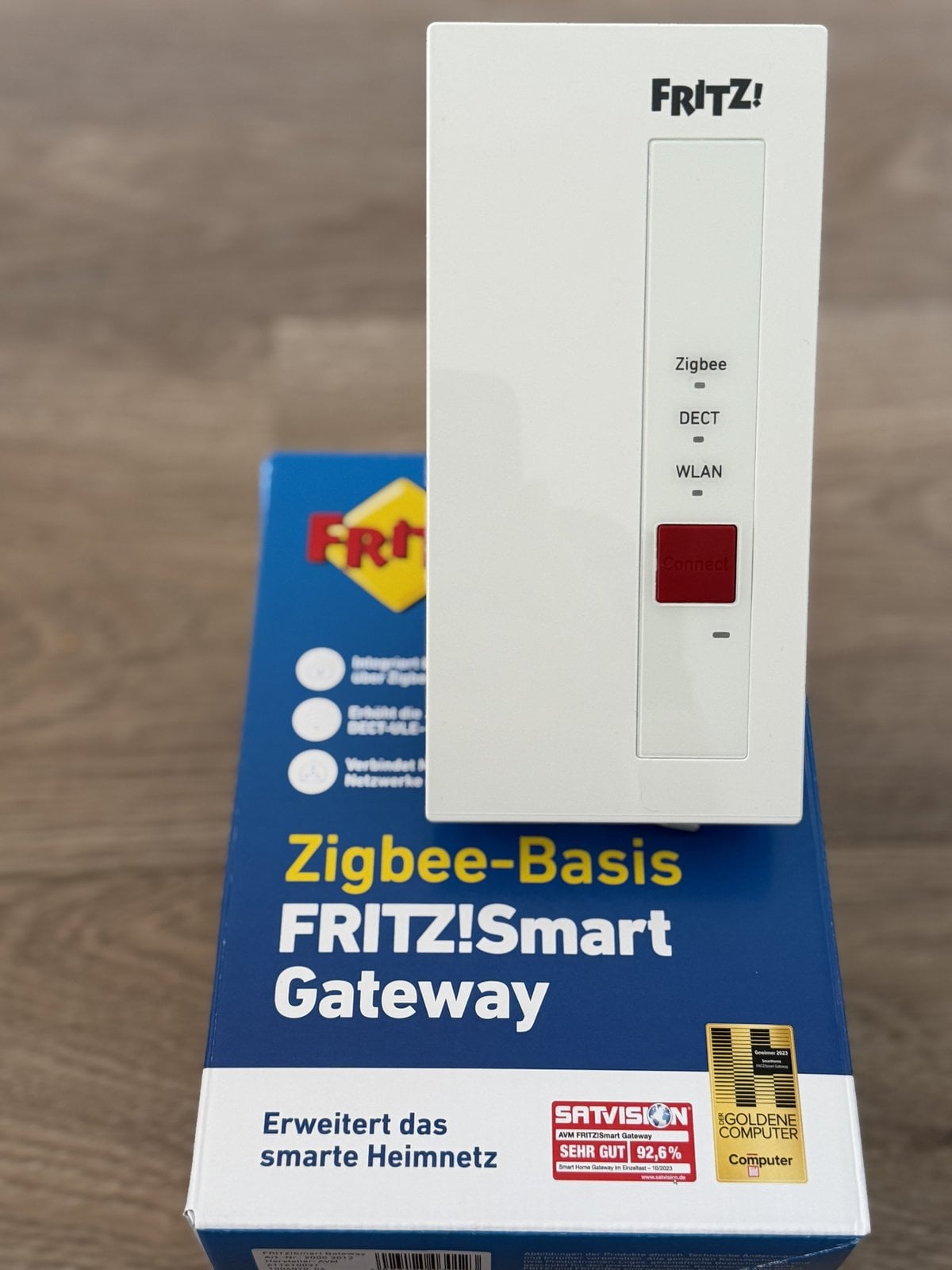
| Connect LED | Meaning |
|---|---|
| solid green | connected to the FRITZ!Box (Wi-Fi or LAN) |
| solid orange | weak connection to the FRITZ!Box |
| slow blink (2 s) | no connection, no Wi-Fi connection configured |
| fast blink (0.5 s) | Connect in progress, update or reboot |
Variant A – over Wi-Fi:
- Plug the gateway into a socket near the FRITZ!Box.
- Wait until the Connect LED blinks slowly. (The gateway boots in about 60 seconds.)
- Press the Connect button on the gateway – the LED now blinks quickly.
- Within 2 minutes, start the pairing on the FRITZ!Box: briefly press Connect, Connect/WPS or WPS. If the button is labelled WLAN/WPS or WLAN, hold it until the Wi-Fi LED on the box blinks.
Once connected, the Connect LED goes solid. If it keeps blinking slowly, repeat steps 3 and 4. Mesh is enabled automatically.
Variant B – over LAN: attach the gateway to the network, plug it in, wait for the Connect LED to go solid, then press Connect on the gateway and confirm on the FRITZ!Box within 2 minutes using the same button logic. With mesh active the Connect LED turns green again and the gateway appears under Heimnetz → Mesh (Home Network → Mesh) with a mesh symbol. I connected over Wi-Fi myself – the LAN route is as described in the manual.
Both variants assume a device in factory state – so reset a second-hand gateway first by holding Connect for 15 seconds.
Opening the gateway’s web interface
You need this for updates and – crucially – for the Matter pairing. In the browser of any device on your network, open http://fritz.smartgateway and enter the FRITZ!Smart password from the rating label. If you run several gateways, go to http://fritz.box and then Heimnetz → Mesh → Mesh Übersicht (Home Network → Mesh → Mesh overview) and click the name of the gateway in question. As of FRITZ!OS 8.50, FRITZ! recommends http://fritzbox.local for the FRITZ!Box interface, but fritz.box still works on your home network.
One detail that trips people up: type the address with http:// – without the prefix the browser starts a web search instead.
Registering Zigbee devices on the gateway
This works exactly as it does on the box, just with the gateway button: start pairing on the smart home device and press Connect on the gateway within 2 minutes. The wizard for Hue serial numbers and installation codes sits in the gateway interface under Smart Home → Geräte und Gruppen → Gerät anmelden (Devices and Groups → Register device).
The device limits on the gateway are almost identical to those on the box – 50 in total, 20 FRITZ! smart plugs and LED bulbs, 40 Zigbee, 30 HAN-FUN – with one addition: a maximum of 5 devices of the FRITZ!Smart Energy 250 type.
Box Zigbee or gateway Zigbee – is there a difference?
Short answer: in the Zigbee radio itself, practically none. I put the technical data from both manuals side by side – the 6670 Cable and the gateway:
| Feature | FRITZ!Box 6670 Cable | FRITZ!Smart Gateway |
|---|---|---|
| Zigbee standard | Zigbee 3.0 | Zigbee 3.0 |
| Frequency range | 2400–2483 MHz | 2400–2483 MHz |
| Max. transmit power | 100 mW | 100 mW |
| Max. Zigbee devices | 40 | 40 |
| Compatibility list | shared FRITZ! list | shared FRITZ! list |
| Registration methods | button, serial number, installation code | button, serial number, installation code |
| Optimised for | Philips Hue (gen. 3 and up), IKEA TRÅDFRI | Philips Hue (gen. 3 and up), IKEA TRÅDFRI |
| Device data in the FRITZ!Box interface | model name and battery level | the same – but only once the two bases have synced |
So there is no difference in the radio itself. And in terms of device data both bases end up in the same place – they sync up, just not straight away. The cross-check below goes into that. If you own a 6670 Cable, 7690 or 5690 Pro, register your Zigbee devices directly on the box anyway: it is the base the FRITZ!SmartHome integration talks to, and the one the household uses through the FRITZ!App Smart Home. If you later go the Matter route, the choice stops mattering, because model name and battery level are lost either way.
Cross-check: the same sensor, once here, once there
Rather than just claiming this, I paired a second Zigbee door/window contact – this time on the gateway instead of the box. The procedure is identical bar one click: at the question about the base you pick the gateway instead of “An dieser FRITZ!Box” (on this FRITZ!Box).
And afterwards they converge again. In the FRITZ!Box they appear in one shared list; the second one merely carries the note “Angemeldet an fritz.smartgateway” (registered on fritz.smartgateway). That is the whole difference.
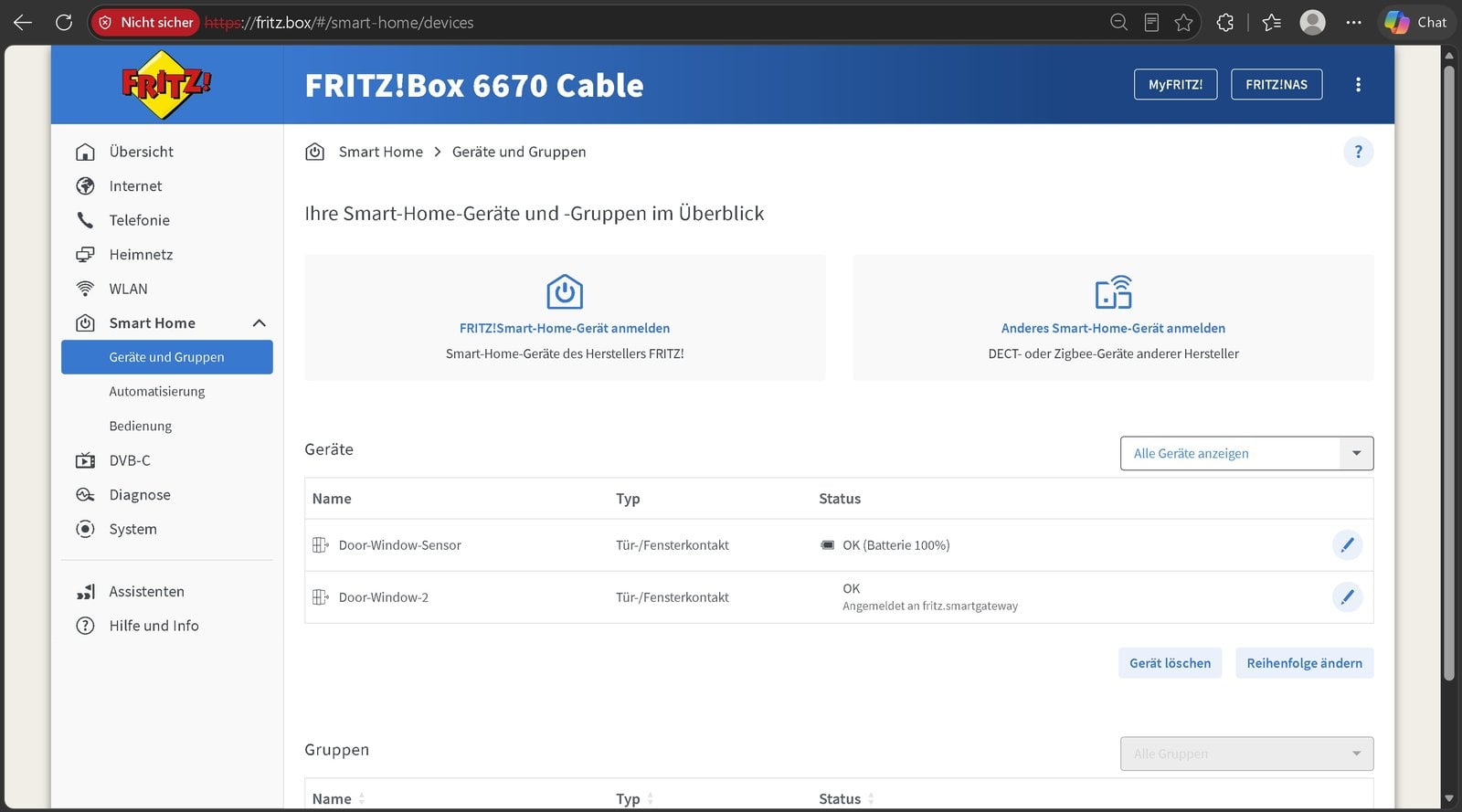
In Home Assistant the sensor from the gateway arrived just like the one from the box – on the same 30-second cadence, just with its own offset: the box entity changed on :05 and :35, the gateway one on :06 and :36. Two independent pollers, one interval — on this route the gateway speeds up nothing.
One difference did strike me at first, though – and it turned out to be purely a matter of time. Because I have two identical sensors, the reported device data can be compared directly. Same model, same firmware, only a different base. Right after pairing, this is how it looked in the FRITZ!Box:
| View in the FRITZ!Box | Sensor on the FRITZ!Box | Sensor on the gateway |
|---|---|---|
| Firmware | 0122052017 | 0122052017 |
| Model name | Zbeacon DS01 | at first just “Zigbee”, Zbeacon DS01 after the sync |
| Battery level | 100 % | at first nothing at all, 100 % after the sync |
| Open/closed | yes | yes, right from the start |
My first conclusion was: the gateway delivers less data. Wrong – it just delivers it later. On the evening of pairing the gateway interface did show the exact mirror image: there the sensor on the gateway reported its battery level and the one registered on the FRITZ!Box did not. By the next morning nothing of that was left – both interfaces showed model name and battery level for both sensors. So the two bases do sync their device data, but it takes them a few hours.
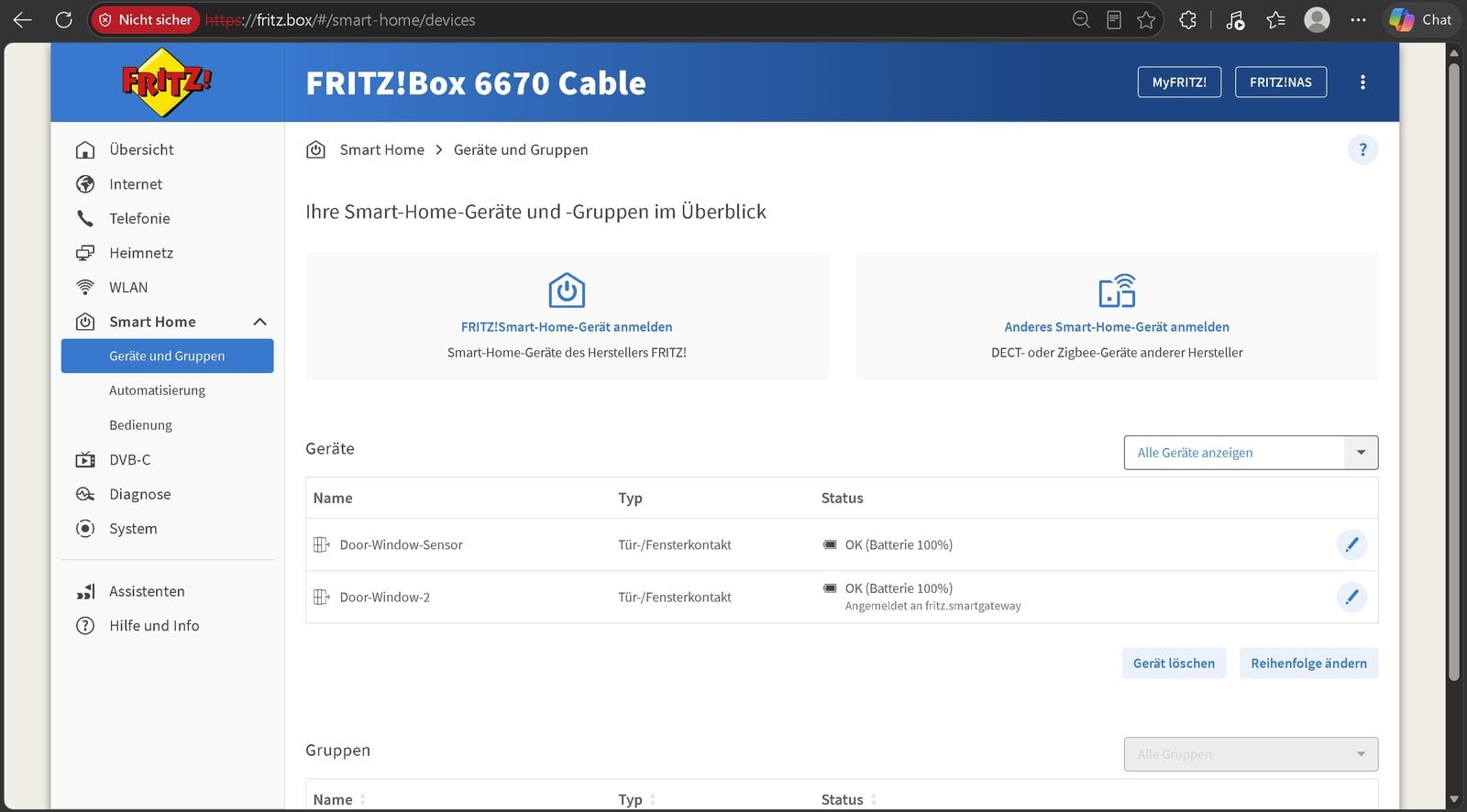
For Home Assistant that has a consequence I only found by going back and looking: the FRITZ!SmartHome integration takes over the device name, the model and the list of entities at the moment you set it up – and does not update them during normal operation. Its diagnostics had been listing productname: Zbeacon DS01 and battery_level: 100 for both sensors for a while; in the device list they were still called “Zigbee #1”, model “Zigbee”, with no battery sensor. Reloading the integration sorted out all of it at once: the names I had since given the devices in the FRITZ!Box, the correct model name – and a battery sensor at 100 % for both sensors. So if something is missing after pairing, reach for Settings → Devices & services → FRITZ!SmartHome → ⋮ → Reload first.
Two integrations? Tempting, but pointless
The first instinct at this point: then I will just add both to Home Assistant – the FRITZ!Box and the gateway. Technically there is little standing in the way; the gateway offers the same interface at its own address as the box does. A call to /webservices/homeautoswitch.lua answers there with “not authorised” rather than “not found”, so the route would exist.
It just does not help, because both bases show the full device list – after the sync even with the same detail data. A second integration would therefore add nothing, it would pull in every device a second time. You would have every window twice in the list, and Home Assistant would have to keep two entries with the same device identifier apart.
So it stays at one integration – and that one attaches to a single base. Which base that is matters less than it first looked: both of them end up knowing every device. If you have the choice, register your devices on the FRITZ!Box anyway – that is the base the FRITZ!SmartHome integration talks to. Going the Matter route sidesteps the question entirely: the bridge passes both sides through, more on that shortly.
Zigbee #1 – even though one already existed. Home Assistant then ends up with two devices of identical name, and the second entity gets _2 appended. Rename devices in the FRITZ!Box before you pair the next one, or matching them up becomes guesswork. And I do mean before: I only renamed both sensors in the FRITZ!Box later on. Home Assistant picked up the new names after a reload of the integration, but the entity IDs stayed binary_sensor.zigbee_1_alarm and binary_sensor.zigbee_1_alarm_2.
What the gateway genuinely adds
Three things – and only one of them has anything to do with Zigbee:
- The Matter bridge. That is the real point. Your FRITZ!Box – however good its Zigbee – does not speak Matter unless it is a 5690 Pro. The gateway does, and it gets your FRITZ! smart home into Home Assistant with push updates.
- The total limit rises from 50 to 100 devices. According to the manual this applies to a gateway or a second FRITZ!Box as a mesh repeater. If you are well below 50 devices, this is not an argument.
- It takes load off the DECT side. No phones hang off the gateway, so the limitation described earlier — more than three cordless handsets — does not apply there. That affects DECT-ULE, not Zigbee.
Which Zigbee devices are supported?
This list applies to both – a FRITZ!Box with Zigbee and the gateway. And this is where you have to be careful with older reviews: at launch the manufacturer supported little more than bulbs and plugs, and that state of affairs still haunts write-ups today. FRITZ! now maintains an official Zigbee compatibility list with seven categories (as of 24 August 2026; FRITZ! extends it continuously):
| Category | Supported manufacturers (selection) |
|---|---|
| Lighting | Philips Hue, IKEA TRÅDFRI, Ledvance, Osram, Paulmann, Müller-Licht, Livarno, Innr, EcoDim, Iluminize, ubisys |
| Smart plugs | IKEA, Philips Hue, Aeotec, Bosch, Busch-Jaeger, Ledvance, Osram, Paulmann, Schneider Electric, Silvercrest, NOUS, Trust, Xenon |
| Sensors | IKEA, Philips Hue, Aeotec, Bosch, frient, Schneider Electric, Shelly, Silvercrest, Sonoff, Trust |
| Buttons & switches | IKEA, Philips Hue, Aeotec, Ledvance, Livarno, Paulmann, Silvercrest, Sonoff |
| In-wall modules | Shelly, Sonoff, NodOn, Nexentro, Schneider Electric, EcoDim, Iluminize, ubisys, Philips |
| Blinds | IKEA (FYRTUR, PRAKTLYSING, TREDANSEN), Livarno |
| Repeaters | IKEA TRÅDFRI signal repeater |
Three things stand out. First: in both the FRITZ!Box and the gateway manual, FRITZ! states the system is optimised for Philips Hue (generation 3 and up) and IKEA TRÅDFRI – those two ranges have the highest hit rate. Second: under sensors there are only motion detectors, water detectors and temperature/humidity sensors. Zigbee door/window contacts are missing from the list entirely – which does not mean none of them work; more on that in a moment. Third: exactly one device is approved as a Zigbee repeater.
If you want to build a larger Zigbee network you have considerably less room here than with ZHA or Zigbee2MQTT, where practically every mains-powered Zigbee actuator works as a router – an ESP32-C6 as a Zigbee router, for instance. The list says what FRITZ! has tested, incidentally, not what will work: unlisted devices may well work, FRITZ! just does not guarantee it.
That is exactly what I tried. I registered a Zigbee door/window contact (Zbeacon DS01) – precisely the device class that does not appear in the FRITZ! list at all. Registration on the FRITZ!Box 6670 Cable went through without a detour, the contact reliably reports open and closed, and the FRITZ!Box even shows the battery level.
That confirms the point above: the list is a promise, not a fence. Just without a guarantee – if your device is not on it, buy it prepared to send it back.
Part 3: into Home Assistant
There are two routes: the FRITZ!SmartHome integration, which polls the FRITZ!Box on a schedule, and the gateway as a Matter bridge, which reports changes the moment they happen.
Route 1: the FRITZ!SmartHome integration (via the FRITZ!Box)
Home Assistant ships with the FRITZ!SmartHome integration (domain fritzbox, formerly AVM FRITZ!DECT). It talks to the FRITZ!Box and gets everything registered in the FRITZ! smart home through it – Zigbee devices included, whether they hang off the box or the gateway. The reason: to the FRITZ!Box a Zigbee device is not a special case but an ordinary smart home unit in the same device list – and that list is exactly what Home Assistant polls.
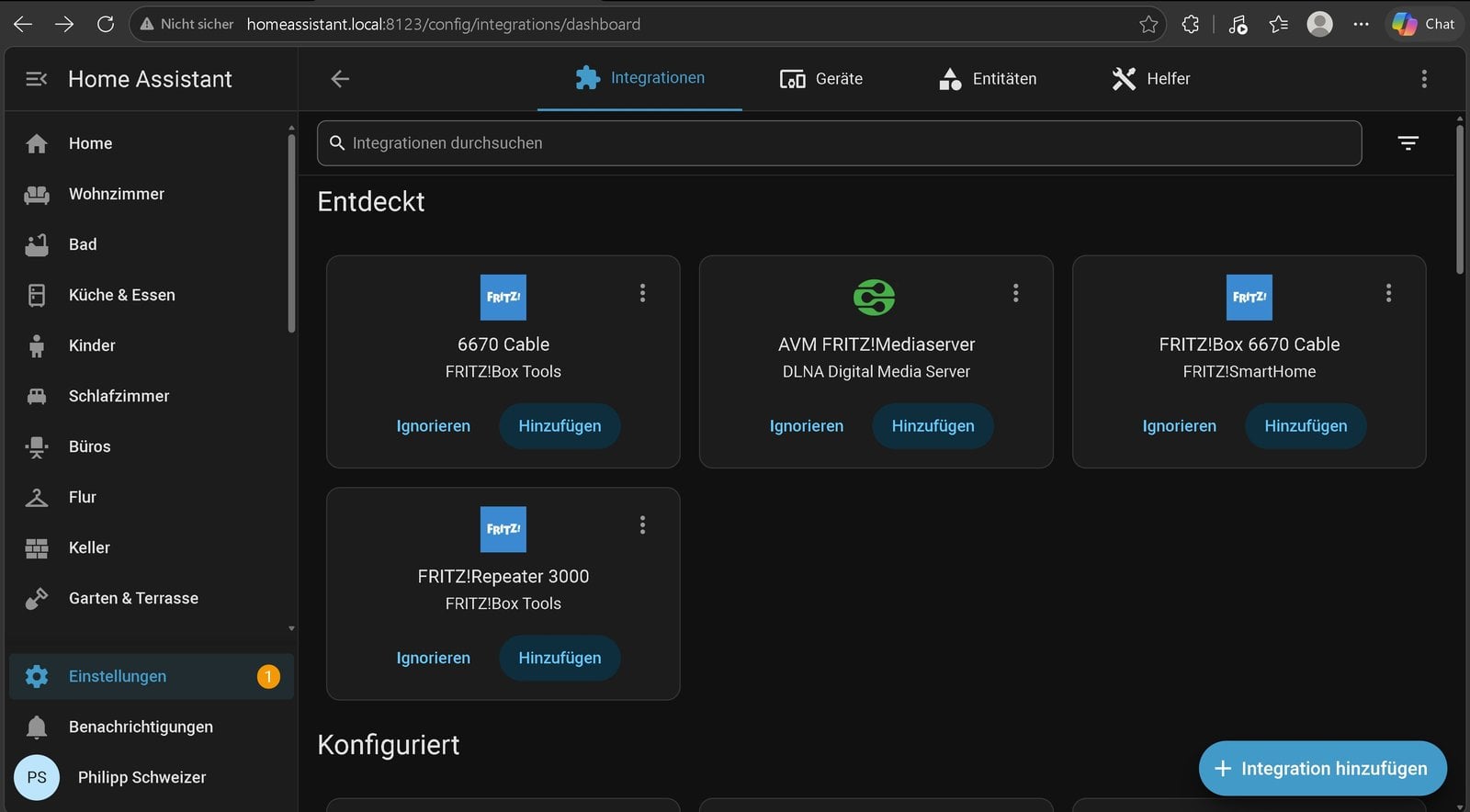
FRITZ!Box Tools or FRITZ!SmartHome – which one?
Home Assistant discovers the FRITZ!Box automatically via SSDP and suggests two different integrations. That is confusing, but quickly explained – the two do completely different things and do not exclude each other:
| Integration | What for | Delivers |
|---|---|---|
| FRITZ!Box Tools | the router itself | WAN status, throughput, CPU temperature, Wi-Fi switch, reboot button, presence detection |
| FRITZ!SmartHome | the smart home | bulbs, plugs, thermostats, sensors – everything registered via DECT or Zigbee |
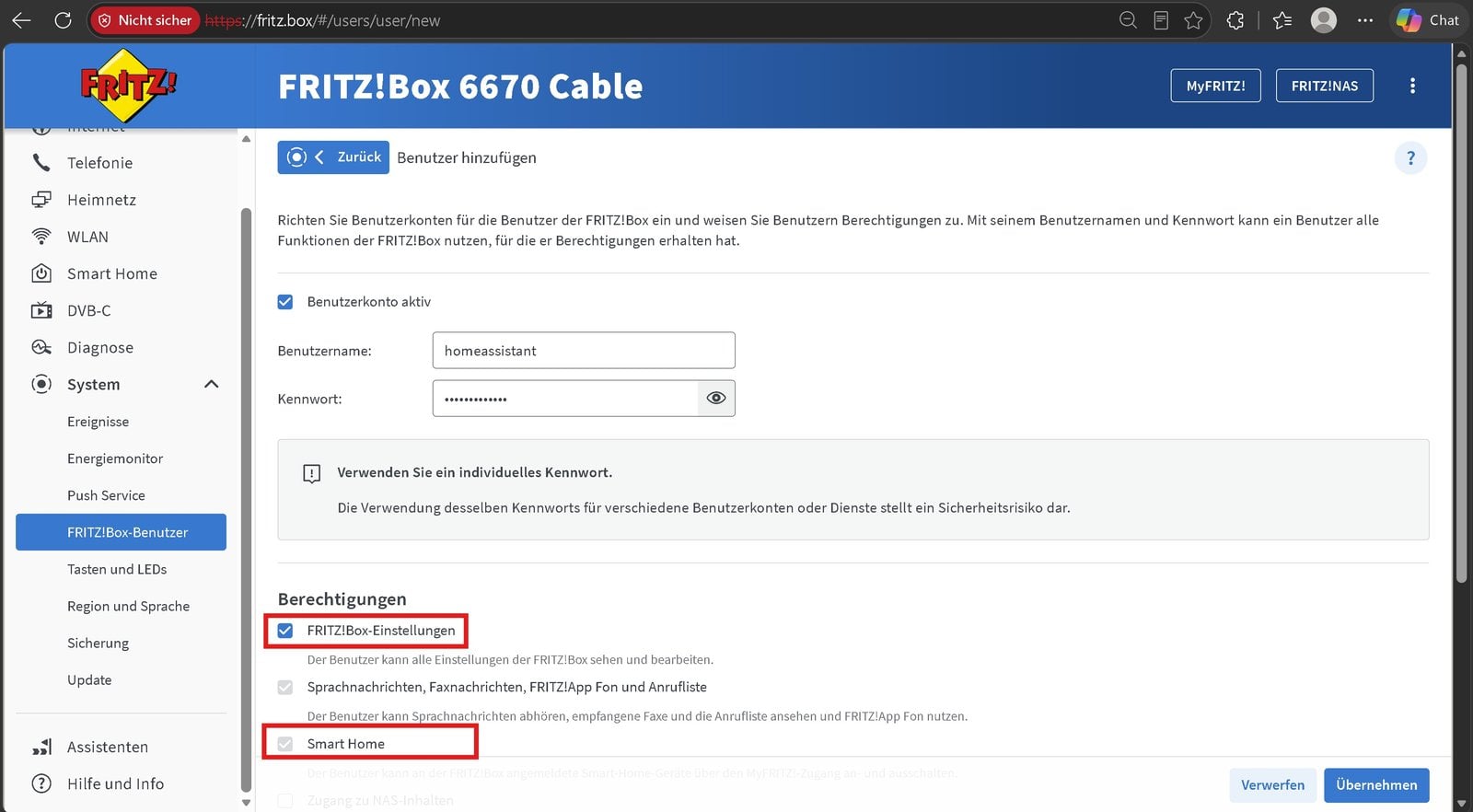
For this tutorial we need FRITZ!SmartHome. FRITZ!Box Tools is worth a recommendation nonetheless: presence detection via connected network devices is one of the most reliable ways for Home Assistant to know whether anyone is home. Both can run in parallel, but FRITZ!Box Tools needs a user with the “FRITZ!Box-Einstellungen” (FRITZ!Box settings) permission – more on that in step 1.
Step 1: create a dedicated user in the FRITZ!Box
Please do not use your admin login for this. A dedicated user can be disabled at any time without you having to change the box password. In the FRITZ!Box interface go to System → FRITZ!Box-Benutzer (System → FRITZ!Box users) and click Benutzer hinzufügen (Add user).
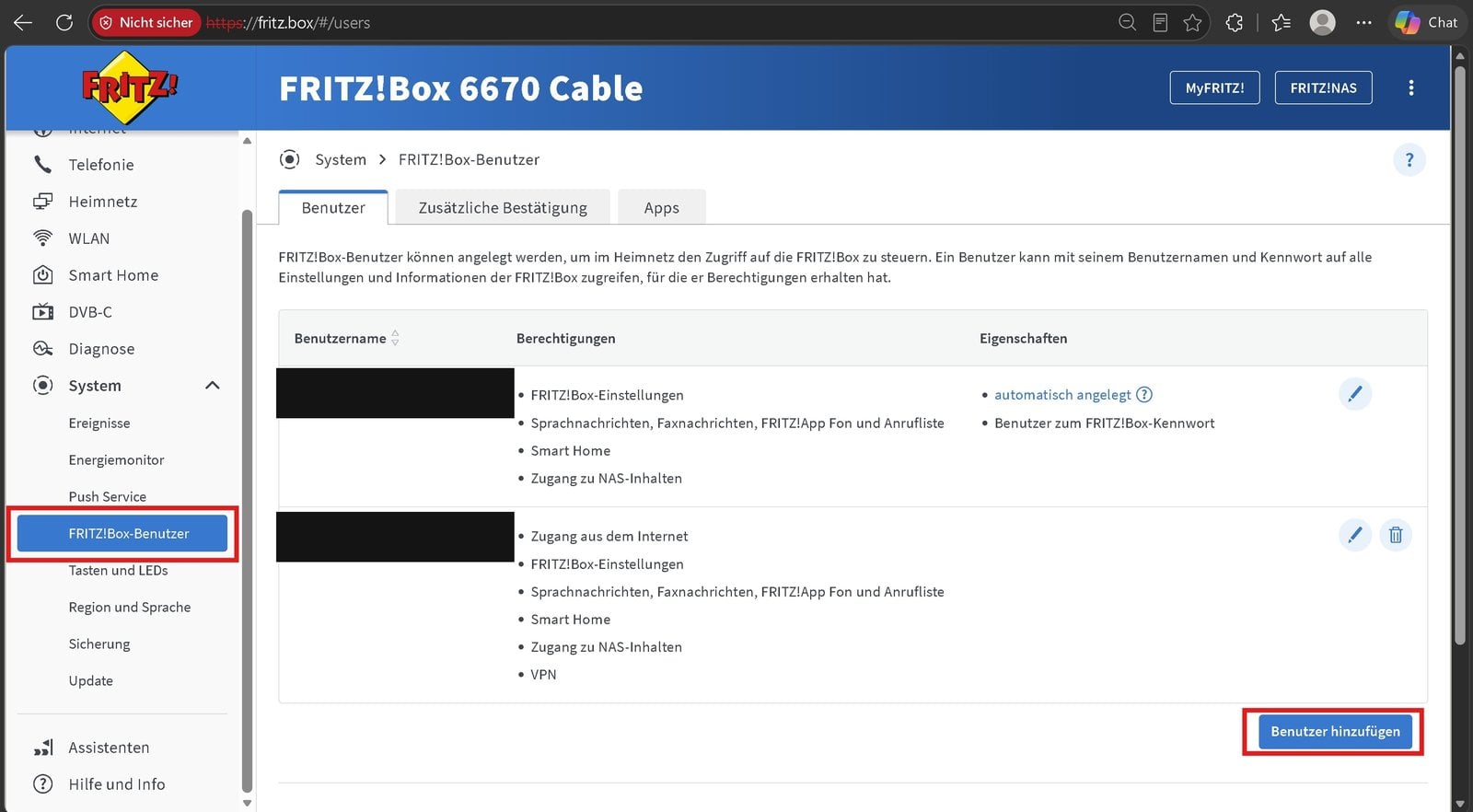
Give it a meaningful name – homeassistant works nicely – and its own long password. What matters is the Smart Home permission: without it, Home Assistant will not see a single bulb later. If you also want FRITZ!Box Tools, that integration needs the FRITZ!Box-Einstellungen (FRITZ!Box settings) permission. Give it to a second user, so the smart home account can’t do more than it needs to.
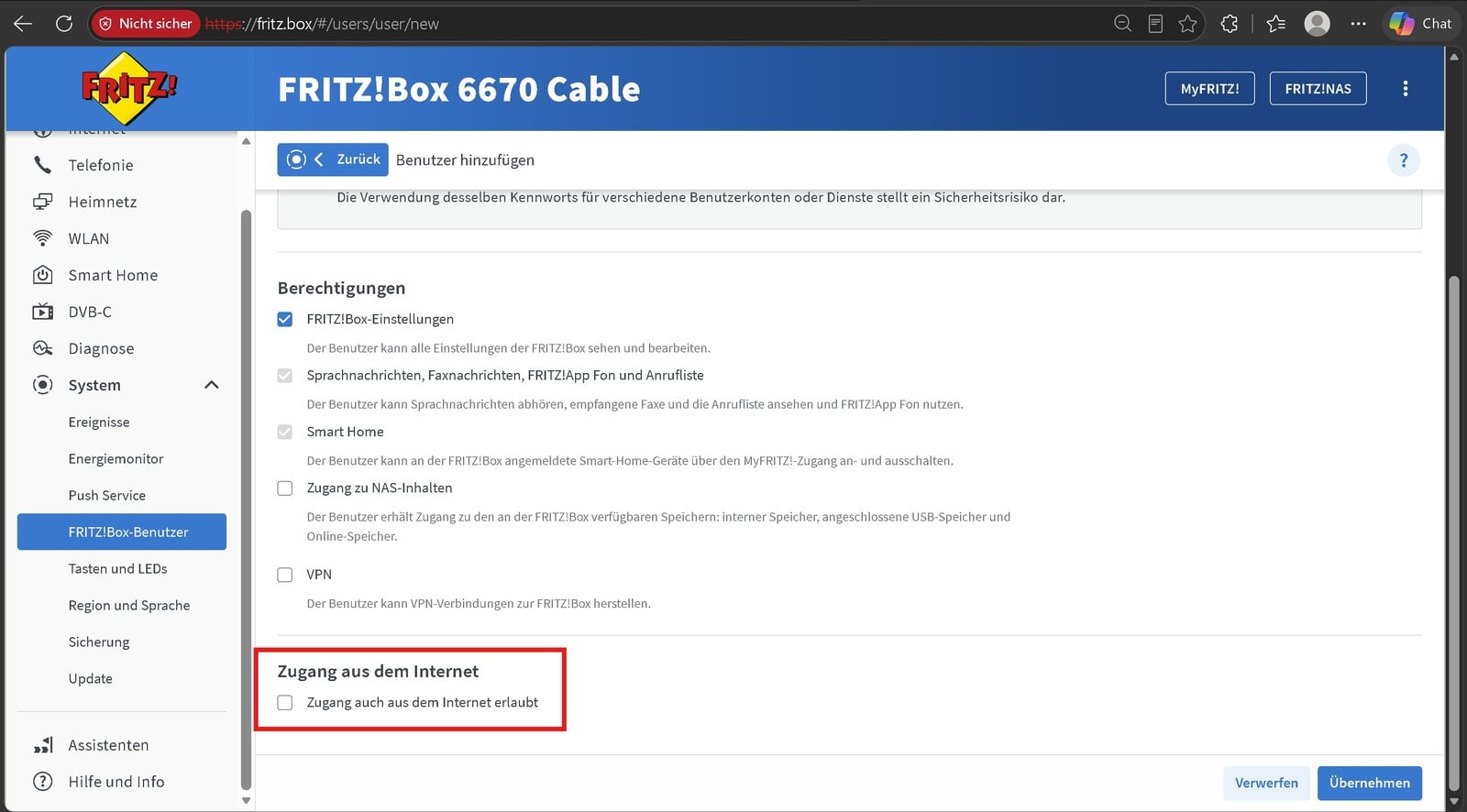
One point you should not skip: scroll down and leave “Zugang auch aus dem Internet erlaubt” (allow access from the internet) switched off. Home Assistant sits on the same local network and needs no route in from outside. An account with smart home rights that is reachable from the internet is exactly the kind of door you do not want standing open.
Step 2: set up the integration in Home Assistant
In Home Assistant under Settings → Devices & Services the FRITZ!Box usually already shows up under “Discovered” – so you do not have to search manually. Click Add on FRITZ!SmartHome, then enter the username and password of the user you just created.
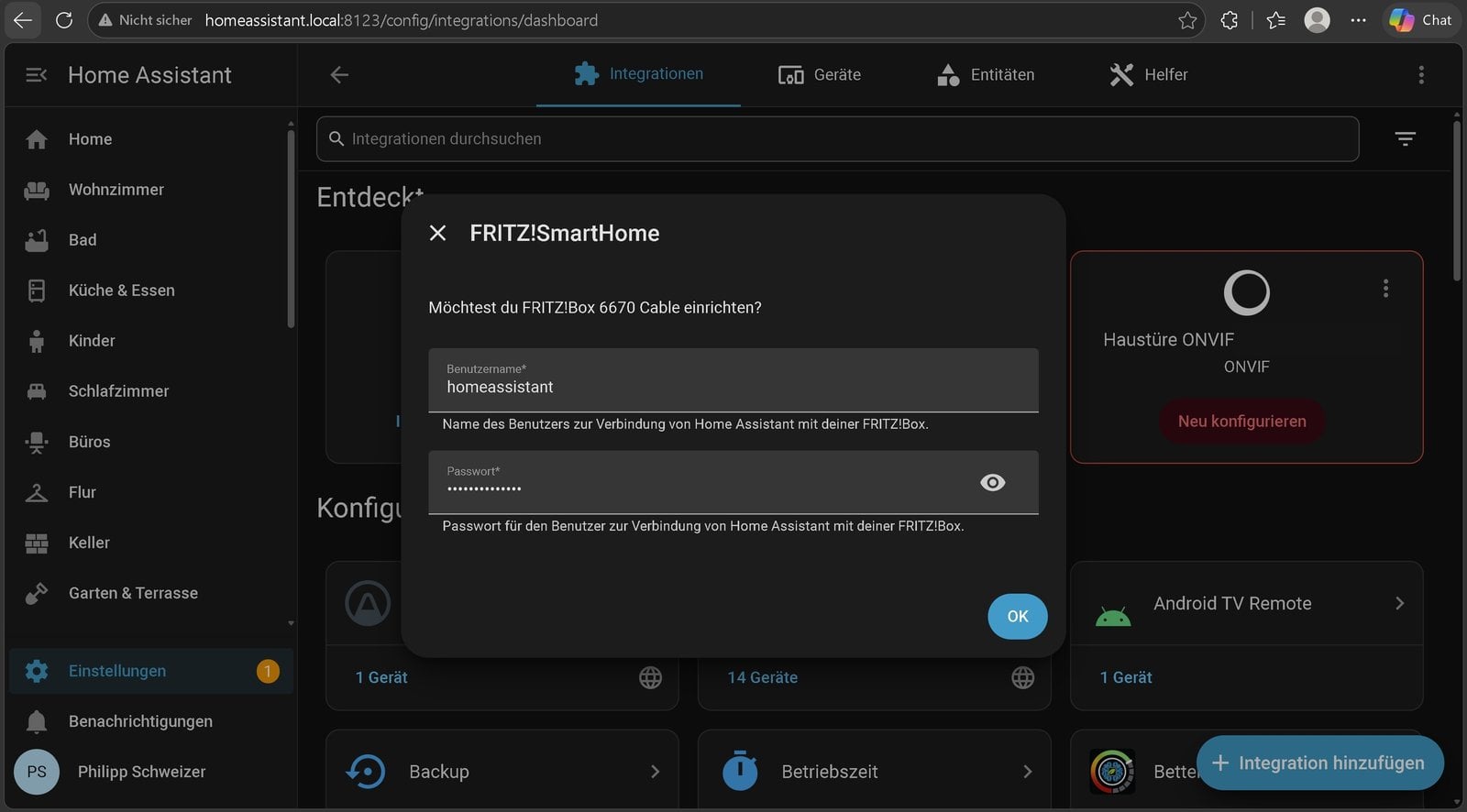
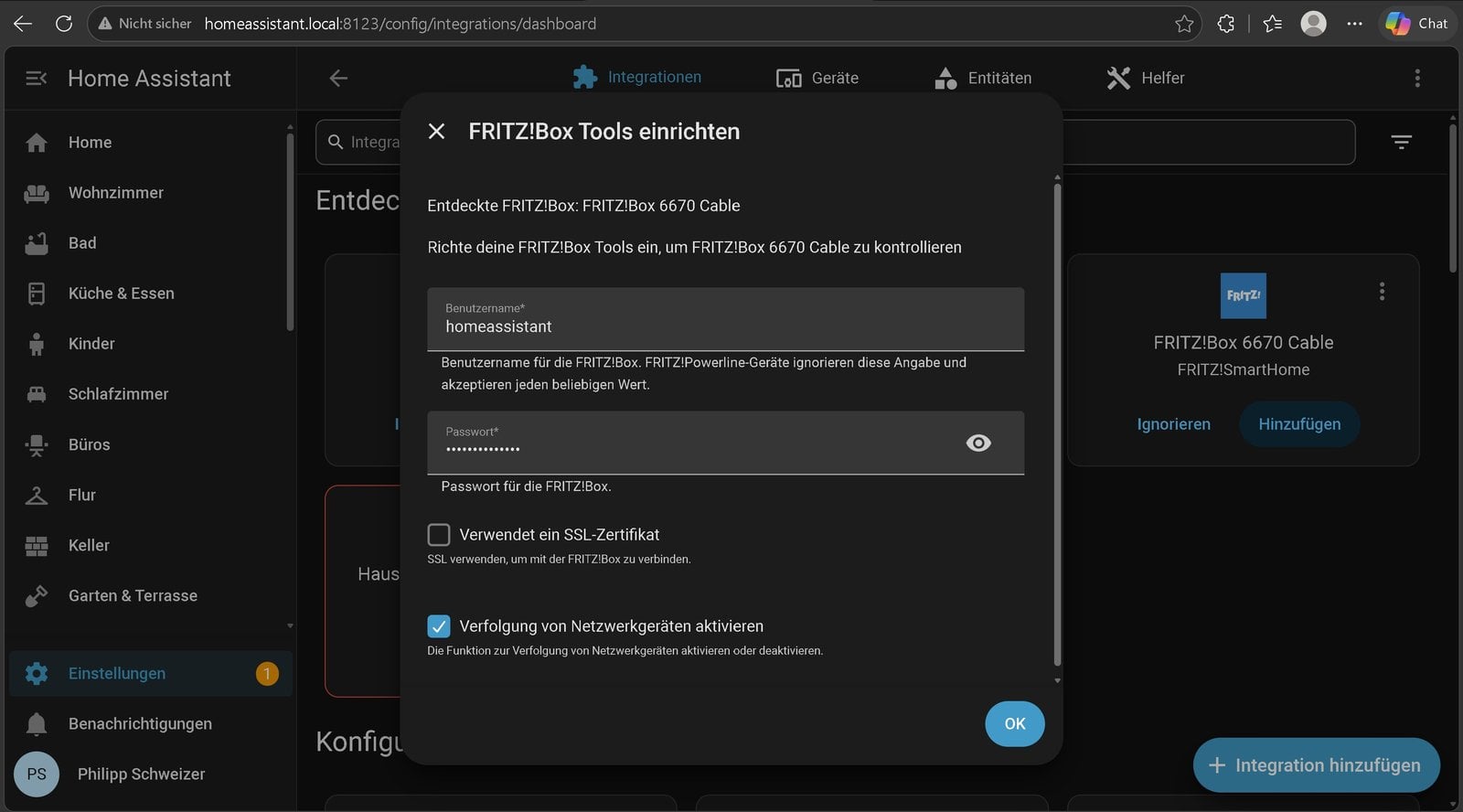
If you want to grab FRITZ!Box Tools at the same time, repeat the process with the user that has the FRITZ!Box settings permission – there you additionally get the option Enable network device tracking for presence detection.
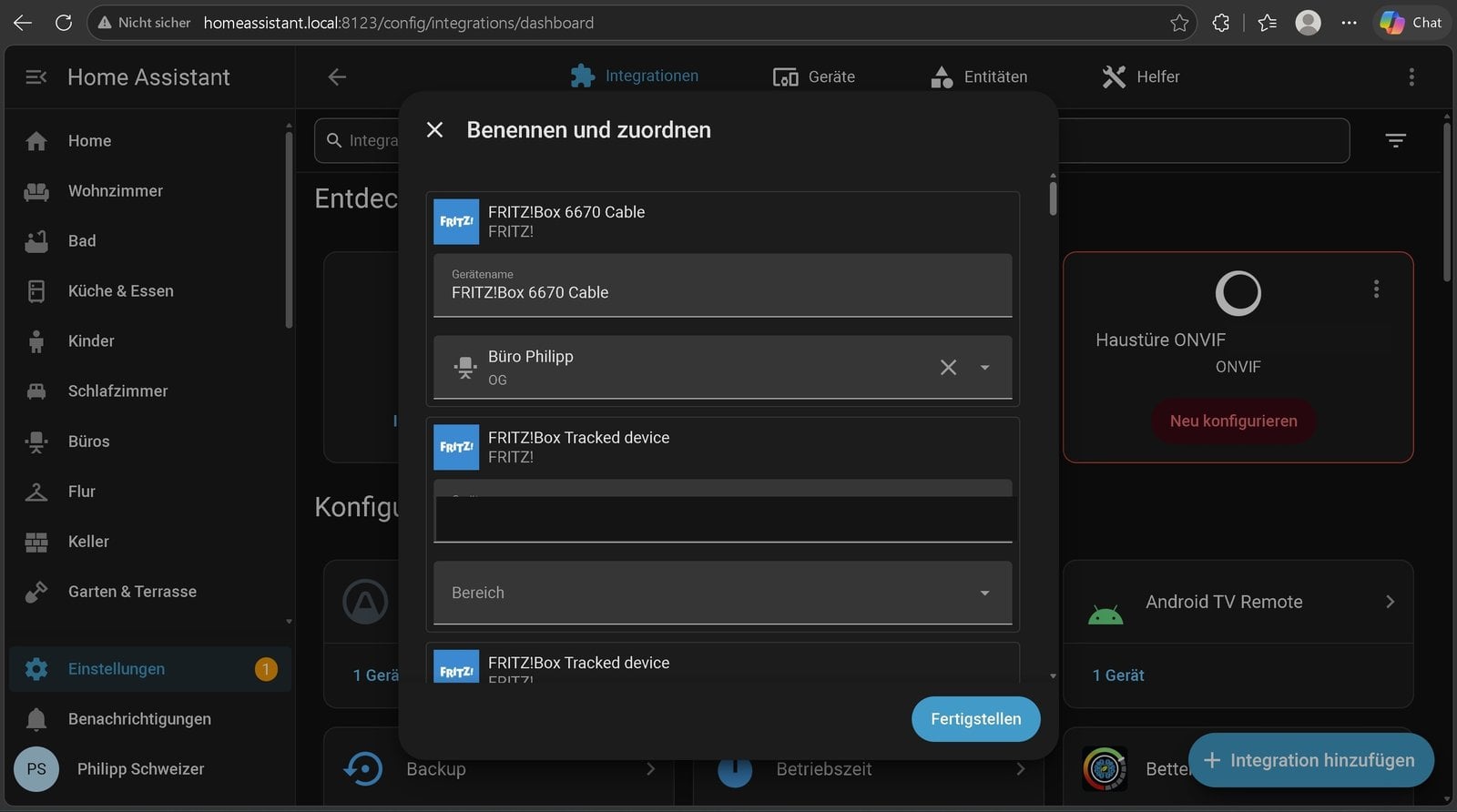
After that Home Assistant asks which areas the discovered devices should be assigned to. You can also do that later.
tr64desc.xml comes up empty there.What makes this confusing is that the gateway does have its own web interface with its own settings, including a Matter menu my FRITZ!Box does not have. That is no contradiction – it is the heart of the matter: you need that interface for route 2. There the gateway is paired separately – but through the Matter integration and with its own setup code, not through FRITZ!SmartHome.
One pitfall with several FRITZ! devices in a mesh: only the FRITZ!Box holding the mesh master role should be added via the integration. Adding repeaters as well achieves nothing but duplicate entries.
What arrives via route 1 – and what does not
And here it gets uncomfortable: the FRITZ!Box AHA interface has no push mechanism, so the integration polls the box every 30 seconds instead. What that means per device type:
| Device type | In Home Assistant via route 1 |
|---|---|
| Bulbs (Zigbee & DECT) | ✅ as a light entity |
| Smart plugs | ✅ as a switch, plus sensors for power, current, voltage, energy, temperature |
| Radiator controls | ✅ as climate, plus battery, window-open, summer/holiday mode and more |
| Blind actuators | ✅ as cover |
| Sensors (temperature, humidity, battery) | ✅ as sensor / binary_sensor |
| FRITZ! templates | ✅ as a button, triggerable from HA |
| FRITZ! routines | ✅ as a switch, can be enabled/disabled |
| Buttons & switches (Zigbee and DECT) | ❌ no button presses as triggers – only any sensors they may have, such as battery or temperature |
| Motion detectors, door/window contacts | ⚠️ sensor values yes, but only every 30 s – practically useless as an automation trigger |
binary_sensor with device class window that switches cleanly between open and closed, and a sensor carrying the battery level in per cent. On top of that comes a battery-warning binary sensor that the integration creates disabled by default; enable it in the entity settings if you want the warning. And if the battery sensor does not show up at all: that happened to me too – I had set the integration up before the contacts were even paired. Reloading the integration created it.
That is the crux, and it applies regardless of where the device is registered, because on route 1 Home Assistant never talks to the gateway, only ever to the FRITZ!Box. In the FRITZ! smart home a Zigbee button works flawlessly; in Home Assistant you cannot use its press as a trigger. A motion detector that can take up to 30 seconds to report is worthless for “turn on the light when someone enters the hallway”. The maintainer of the underlying library puts it unambiguously: buttons will not be added, “because the Fritz!Box api is pull only”.
Home Assistant talks to the FRITZ!Box through its AHA interface. The call getdevicelistinfos returns an XML snapshot of all devices – and that is all there is. You cannot register for changes; the box never reports anything of its own accord. So Home Assistant asks on a schedule: update_interval=timedelta(seconds=30) is hard-coded in the integration’s source and cannot be changed in the interface.
For bulbs and thermostats that is harmless; for buttons it is fatal – for a reason that often gets lost:
| State | Event | |
|---|---|---|
| Example | lamp on, 21.5 °C, 43 watts | button pressed, double-clicked |
| Valid for how long? | until something changes | milliseconds, then gone |
| When polled 20 s later | still correct, just stale | nothing left |
| Usable by polling? | yes | no |
You can see how rigid the schedule is in the history of a real entity. These are the state changes of my Zigbee window contact, exactly as Home Assistant logged them:
| Timestamp in Home Assistant | State |
|---|---|
| 17:26:05 | closed |
| 17:26:35 | open |
| 17:33:05 | closed |
| 17:33:35 | open |
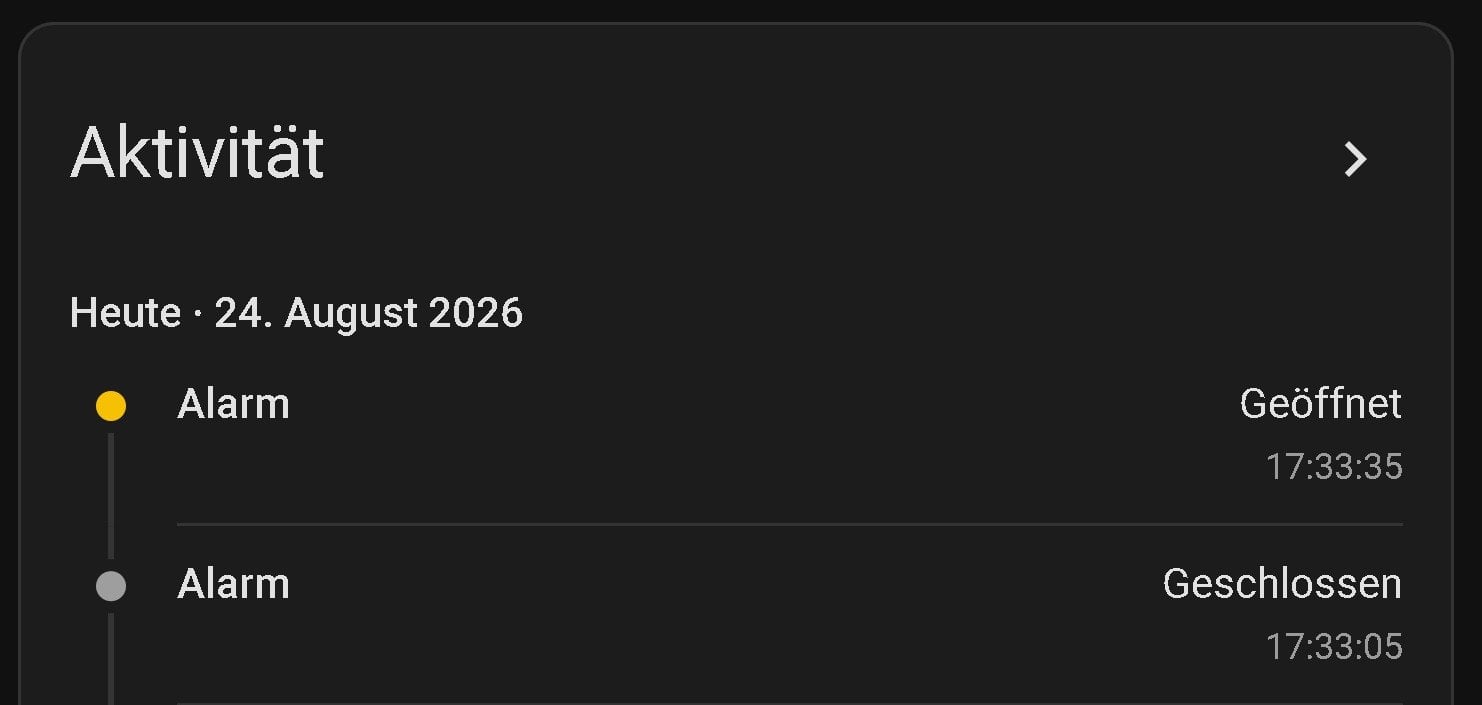
Look at the seconds: always :05 or :35, never anything in between. Call that the grid. The window did not open and close precisely on the half minute – Home Assistant only finds out at those moments. Every change waits until the next polling interval is due. Worst case that is a full 30 seconds of delay, on average 15.
A button press leaves no state you could poll for later. That does not get better with a shorter interval – even polling once per second, most presses would be lost. Motion detectors sit in between: “motion detected” persists for a while, so it does arrive, just up to 30 seconds late.
The schedule can only be shortened so far: Home Assistant lets you disable automatic polling in the system options and instead call the homeassistant.update_entity action from an automation. That has a 10-second debounce, though – and it changes nothing about the button problem.
Is there no faster interface?
The FRITZ!Box has several interfaces – none of them reports smart home events. According to the FRITZ! documentation the TR-064 service X_AVM-DE_Homeauto knows only five actions for querying and switching, functionally even less than AHA. TR-064 is based on UPnP, which does have a subscription mechanism – but in the service description of my FRITZ!Box 6670 Cable (FRITZ!OS 8.25) at http://fritz.box:49000/x_homeautoSCPD.xml there are 36 state variables, and eventing is set to "no" on all 36. Not a single "yes" – and that includes exactly the values you would want to subscribe to: SwitchState, TemperatureCelsius, MultimeterPower, HkrSetTemperature.
FRITZ! does have an event interface, incidentally, but only for telephony: the call monitor on TCP port 1012. There is no smart home equivalent. One final detail settles it: among those 36 variables there is no concept of a button press – only switches, temperature, power and radiator controls.
http://fritz.box:49000/x_homeautoSCPD.xml and search for sendEvents="yes" – with the ="yes", because the attribute itself is present on every one of the 36 variables. If you find hits on your box I would like to hear about it; on mine there is not a single one.
Route 2: adding the gateway as a Matter bridge
The second route is the actual reason the gateway is interesting for Home Assistant users, even if your FRITZ!Box has had Zigbee for ages. It bypasses the FRITZ!Box interface entirely: with Matter the controller does not ask on a schedule, it subscribes. Home Assistant tells the bridge what it cares about, and the bridge sends of its own accord as soon as something changes. So it is not that the gateway is faster; the protocol is a different one. In doing so it passes your entire FRITZ! smart home through to a Matter network: FRITZ!, HAN-FUN and Zigbee devices, whether registered on the gateway or on the FRITZ!Box.
The reverse also holds: a device that already speaks Matter – a Wi-Fi Shelly, say – does not need the bridge and cannot be “moved over” to it either. It registers directly with your controller.
Home Assistant is a fully fledged Matter controller. FRITZ! officially documents only Alexa, Apple Home and Google Home – but the procedure is identical, because pairing runs through an ordinary Matter setup code.
Matter over what? No Thread, and no Thread border router either
The gateway does not do Matter over Thread. It has no Thread radio. The technical data in the manual lists exactly four interfaces:
- Zigbee – Zigbee 3.0, 2400–2483 MHz
- DECT – DECT-ULE, 1880–1900 MHz
- LAN – RJ45, 10/100/1000 Base-T, for the connection to the FRITZ!Box
- Wi-Fi – 2.4 GHz, Wi-Fi 4 (802.11n), likewise only to the FRITZ!Box
The word “Thread” does not appear once in the entire manual – nor anywhere in the 270 pages of the FRITZ!Box 6670 Cable manual. Matter always runs over IP, and that is exactly what the gateway uses: it is already on the home network by cable or Wi-Fi and joins the Matter network that way. That is also why the usual Bluetooth pairing with a phone is not needed – you type in the setup code.
1. The gateway is not a Thread border router. You cannot run any Matter-over-Thread devices with it – no Thread sensors from Eve, Aqara or Nanoleaf. If you need Thread, you still need a border router of your own.
2. The gateway is a bridge, not a controller. FRITZ! distinguishes the roles cleanly itself: a Matter controller is the command centre, a Matter bridge brings devices with non-IP radio into the Matter network. FRITZ! provides the bridge only. So the direction is one-way: your FRITZ!, Zigbee and HAN-FUN devices go out into the Matter network. A third-party Matter device cannot be pulled into your FRITZ! smart home this way.
For Home Assistant that is no problem – on the contrary, it fits well: Home Assistant takes the controller role, the gateway supplies the FRITZ! smart home as a bridge. If you also want to add Thread devices, you need a Thread border router alongside the gateway.
On the FRITZ! side:
- Update the gateway first: in its interface go to System → Update → FRITZ!OS-Version → Neues FRITZ!OS suchen → Update starten (System → Update → FRITZ!OS version → Find new FRITZ!OS → Start update). The Matter bridge arrived on the gateway with FRITZ!OS 7.63; it gets interesting from 8.26. The current version is 8.50 from 28 August 2026 (as of November 2026), released after my test.
- Then go to the Smart Home → Geräte und Gruppen → “Matter-Netzwerke” tab (Devices and Groups → Matter networks). This tab exists only in the gateway, not in the FRITZ!Box.
- Click Matter-Netzwerk verknüpfen (Link Matter network) and then Anmeldevorgang starten (Start registration). The gateway now shows a QR code and a setup code – and gives you exactly three minutes.
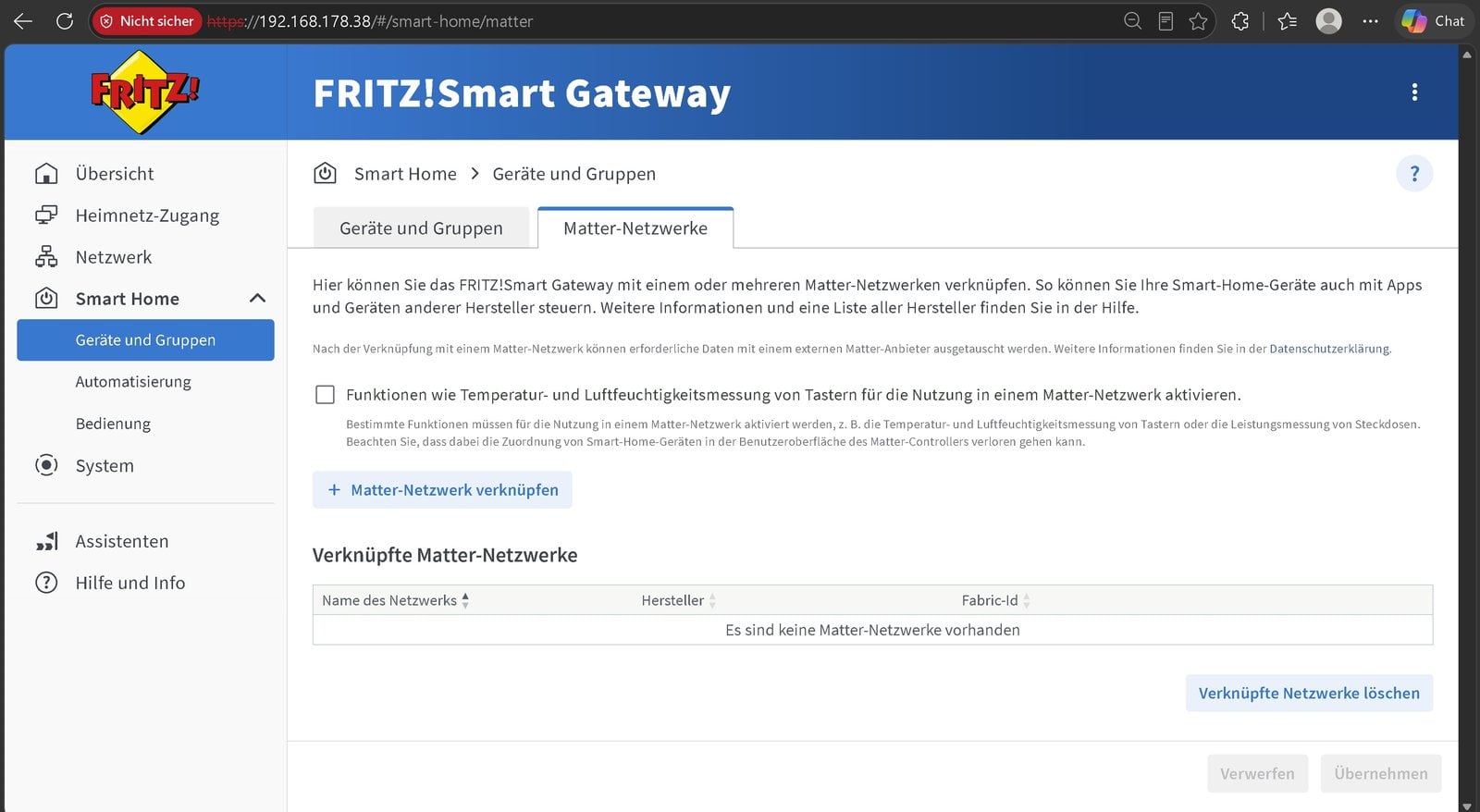
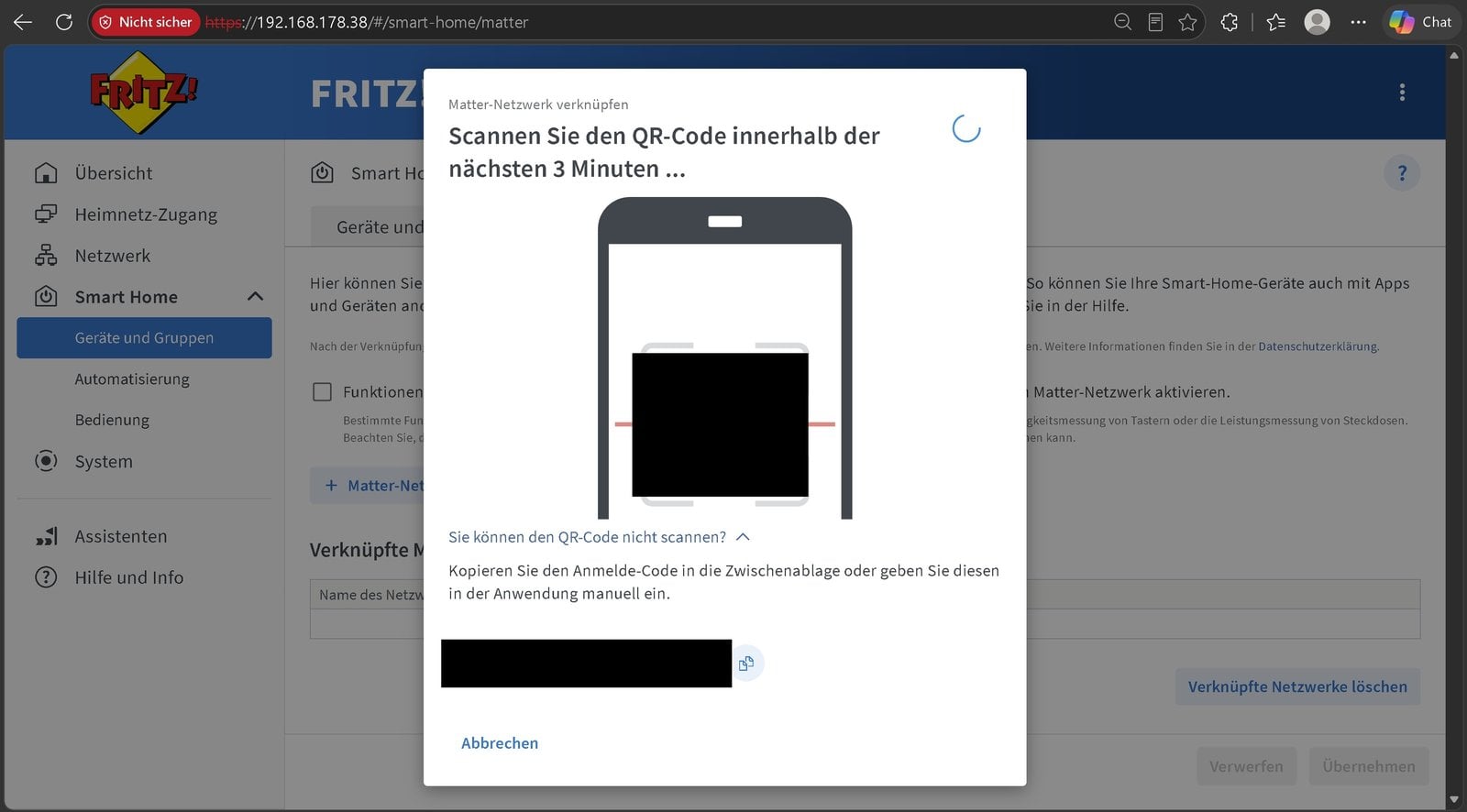
On the Home Assistant side – and where nearly everyone takes a wrong turn
The obvious route would be Settings → Connectivity → Matter → Add device (or the same button under Devices & Services → Matter). That is exactly where I hit a dead end, and I suspect I am not alone. Home Assistant first asks whether the device is new or already in use – and if you pick “new” it tells you to use the Home Assistant Companion app on your phone, which pairs new Matter devices over Bluetooth. For the gateway that makes no sense: it is not a device in the usual sense that needs putting on Wi-Fi first, it is a bridge that has been on the home network all along.
The route that works goes through the Matter server itself: Settings → Apps → Matter Server → Open web UI. There, click Commission node.
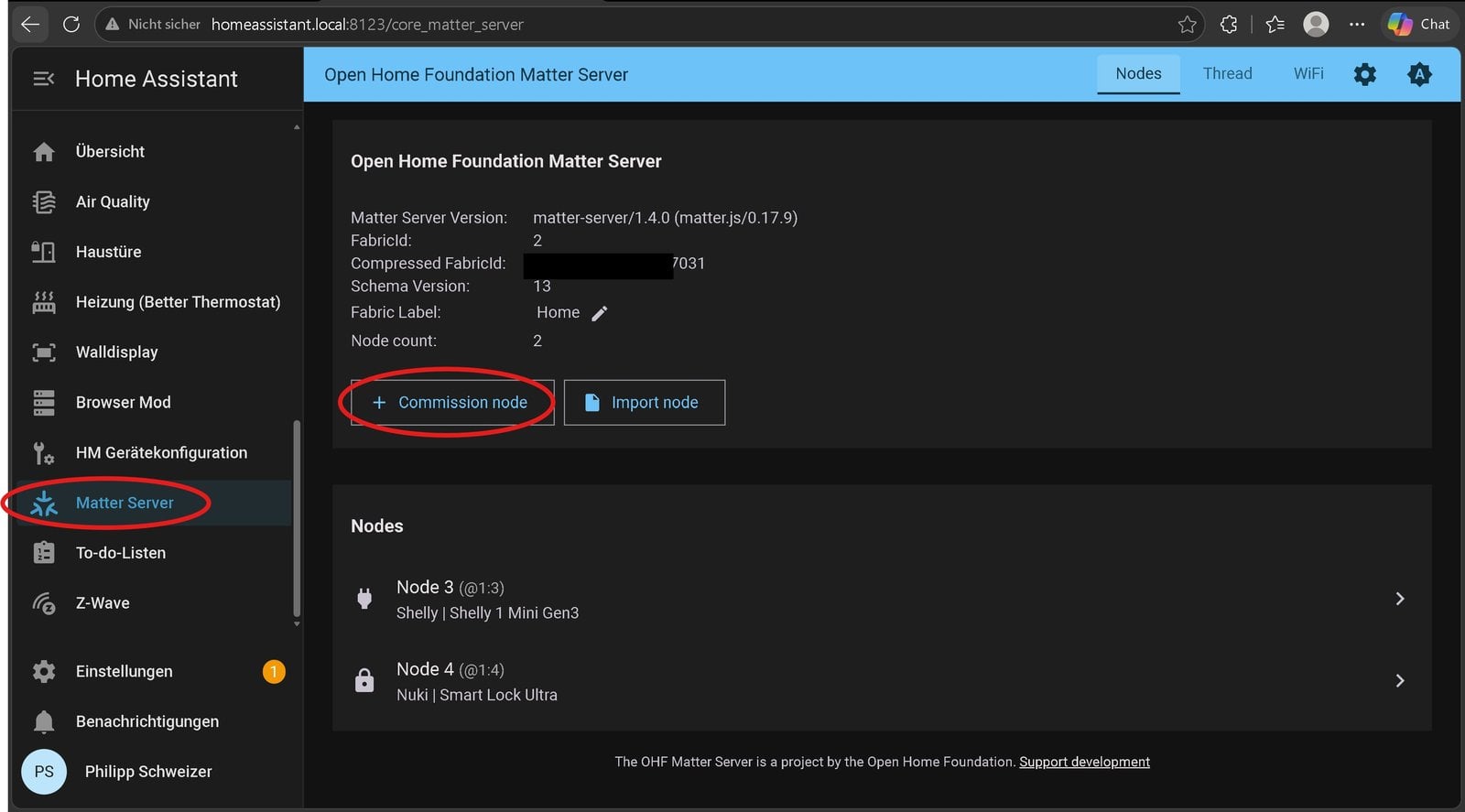
In the dialogue that follows, two of the three entries are greyed out: Commission new WiFi device and Commission new Thread device both require Bluetooth pairing. The right choice here is Commission existing device – the gateway is already reachable on the network, all that is missing is joining the Matter fabric.
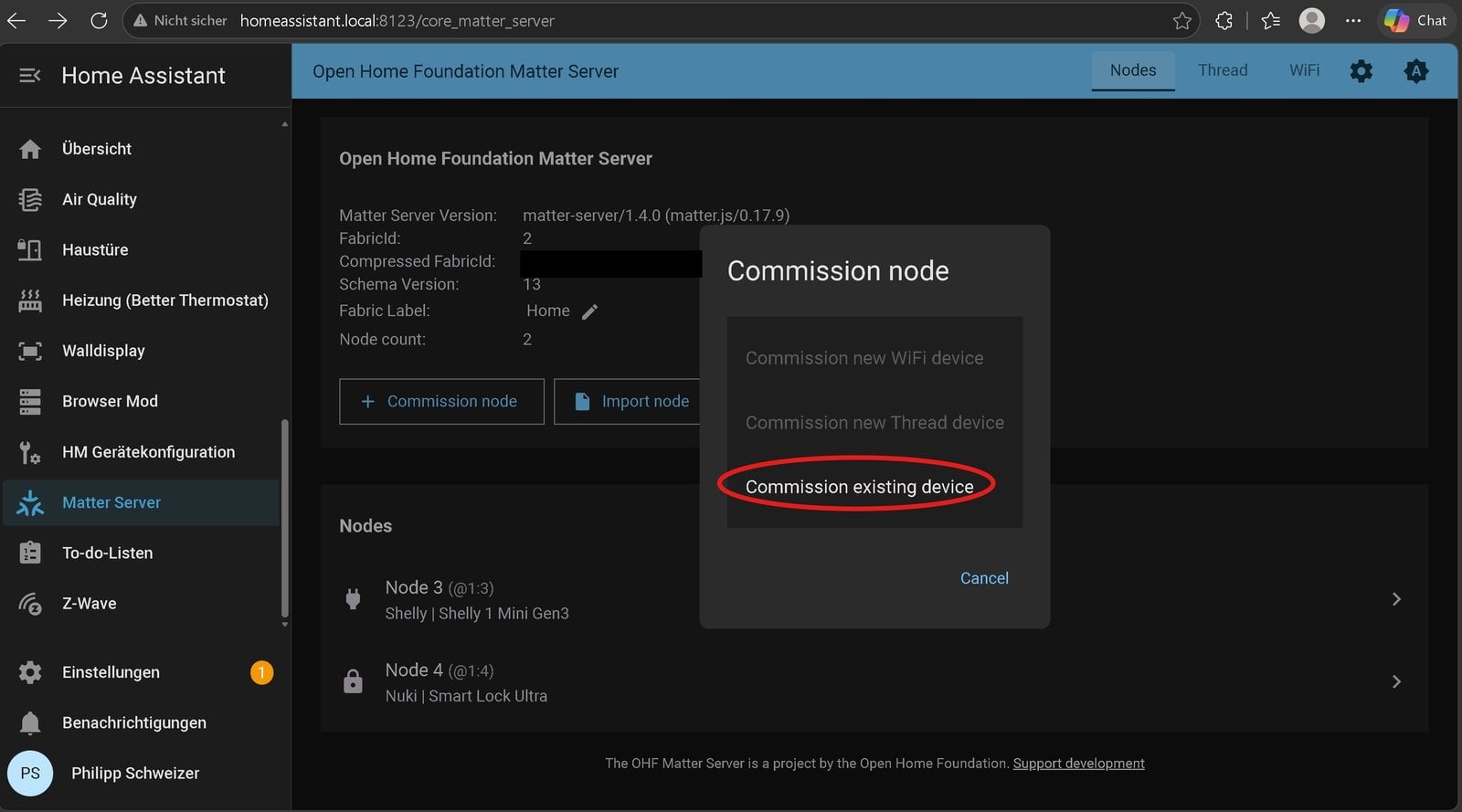
Paste in the setup code from the gateway interface and press Commission.
The stumbling block: Home Assistant rejects the gateway
And this is where it stopped for a while. The setup code is accepted, the connection comes up – and then pairing aborts. The interface only says that adding the device failed. The reason only shows up in the log of the Matter Server app, quoted here as an excerpt, stitched together from several lines and rewrapped:
Establish PASE to device  VP: 4757+265

Attestation finding (error): TrustedAsTestCertificate
  PAA 785ce705… is a test/development certificate;
  device presented a valid test attestation
  but production trust policy is in effect

Commission failed: This device uses a test/development
certificate. To commission it, enable the "Test DCL"
option in the settings.
The first line shows that this is about the gateway. VP: 4757+265 stands for vendor ID 4757 and product ID 265, and that is exactly the identifier under which the “FRITZ!OS Matter Bridge” by FRITZ! GmbH is registered in the Connectivity Standards Alliance database.
Every Matter device identifies itself with a certificate chain when joining. The gateway presents a test or development certificate rather than a production one. Home Assistant checks strictly by default and refuses exactly that. The check reported three findings; the decisive one is that the issuing authority itself is a test instance.
I went on to query the Connectivity Standards Alliance device database. FRITZ! GmbH is listed there as the manufacturer and “FRITZ!OS Matter Bridge” as the model, but the compliance endpoint returned no record for vendor 4757 / product 265. That is not proof of missing certification, only that I could not retrieve one there.
Update, 16 September 2026: The explanation has since come from the manufacturer itself. When I asked, FRITZ! told me that the Matter bridge function is not certified yet. The notice Home Assistant shows for non-certified Matter devices when a FRITZ!Box or the gateway joins its Matter network is known to them. So the rejection is not a fault in your setup but the expected state until certification is complete.
The fix – and its price
The way out is in the error message. Under Settings → Apps → Matter Server → Configuration, enable the option “Enable test-net DCL usage”, save, restart the app and repeat the pairing. Then it goes through.
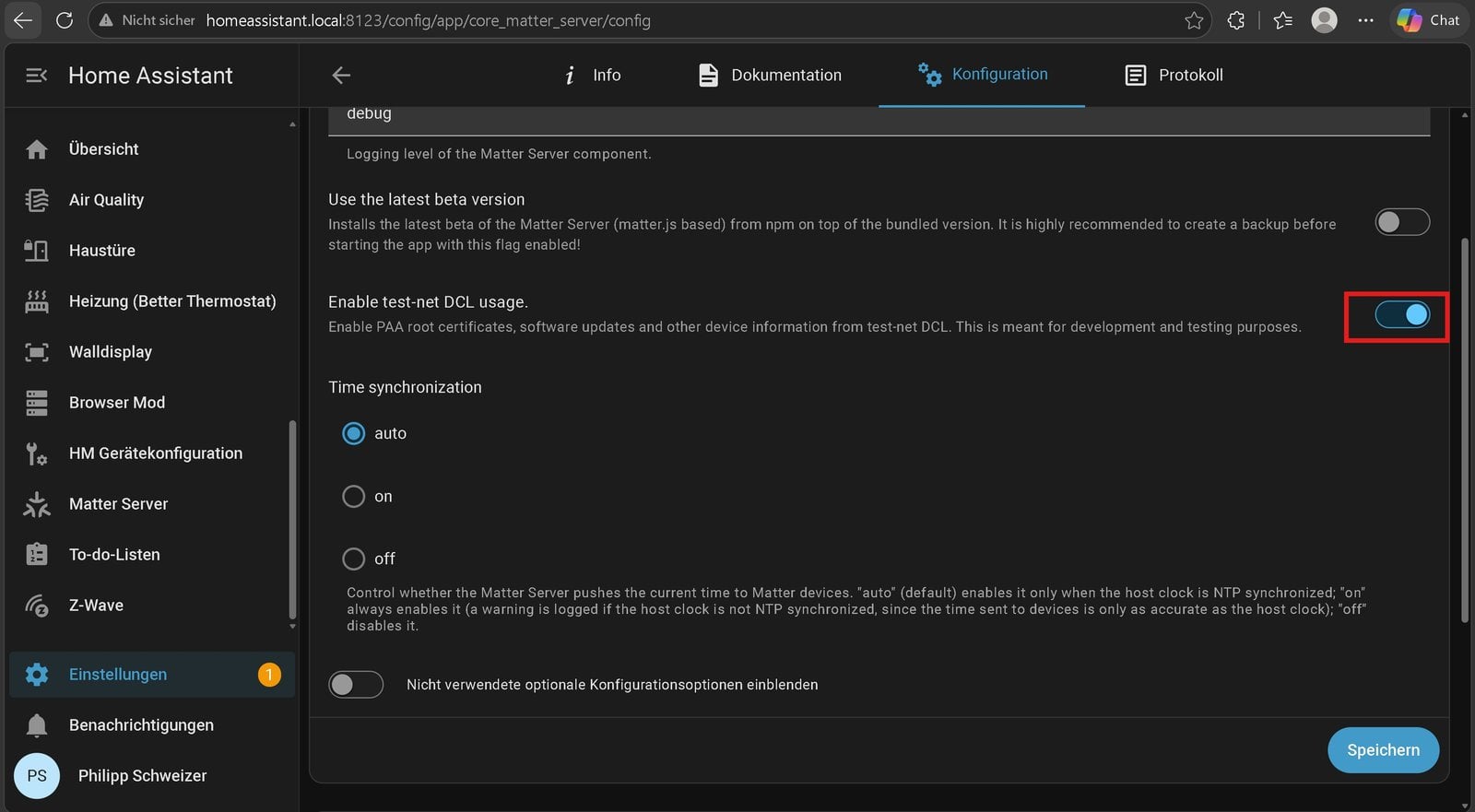
Some perspective: there is no indication that anything is wrong with the device – it identifies itself with a valid chain, just one from the test world rather than the production one. It remains remarkable all the same. The gateway is a shipping product, FRITZ! markets Matter heavily, and yet as a Home Assistant user you trip over an error message at the very first step that cannot be interpreted without looking into the app log. Perhaps that also explains why the FRITZ! guides cover only Amazon Alexa, Apple Home and Google Home – there is not a word about Home Assistant.
Finally, you assign a name for the Matter network in the gateway interface. It shows up later in the list of linked networks – handy if you connect several controllers.
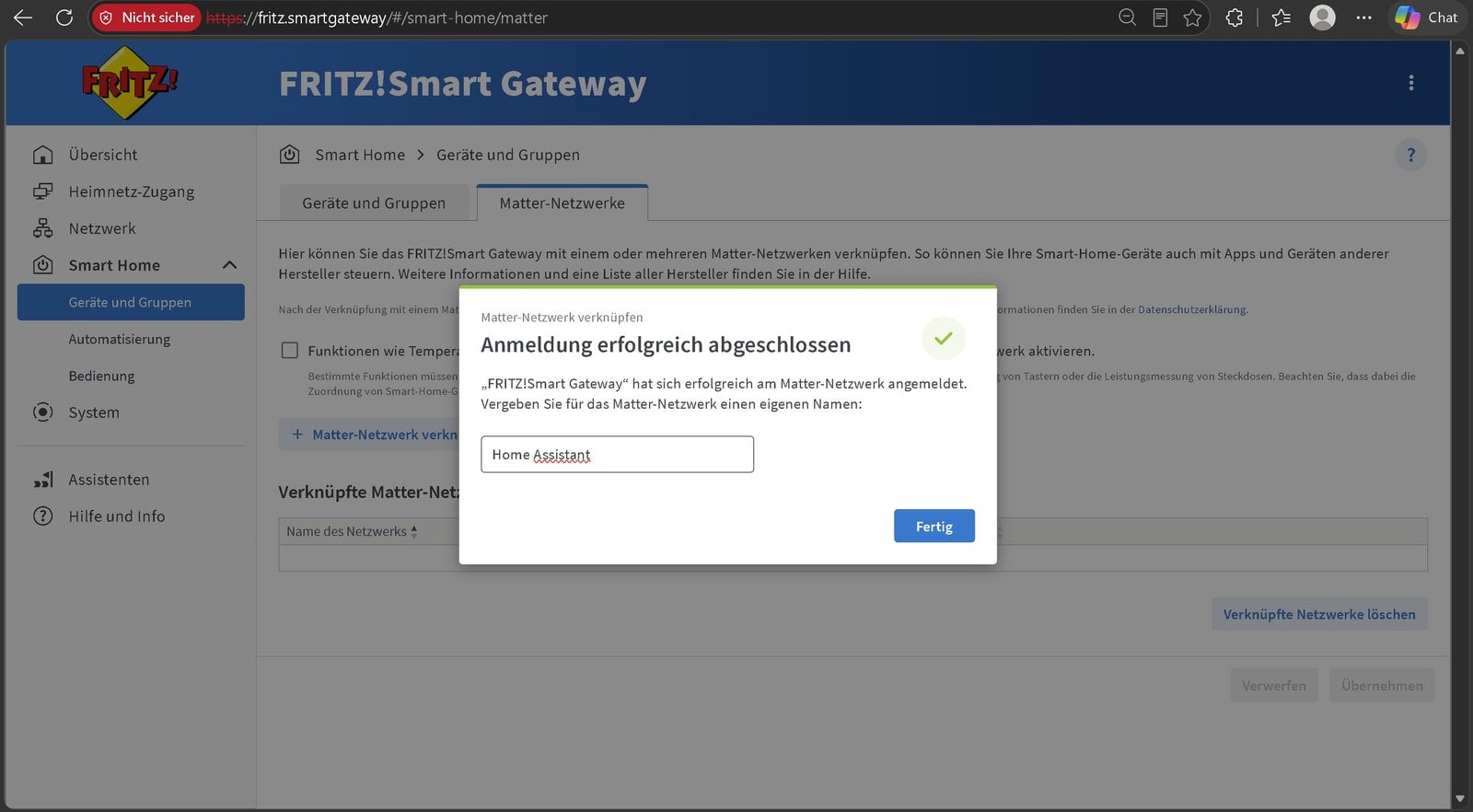
What arrives in Home Assistant via Matter
Home Assistant creates the gateway as a Matter node of its own, and it describes itself cleanly as what it is: Is bridge: true, with Endpoint 0 – Root Node and Endpoint 1 – Aggregator below it. In Matter the aggregator is precisely the role under which a bridge hangs its attached devices. So what you pair here is not a single device but the hub for everything behind it.
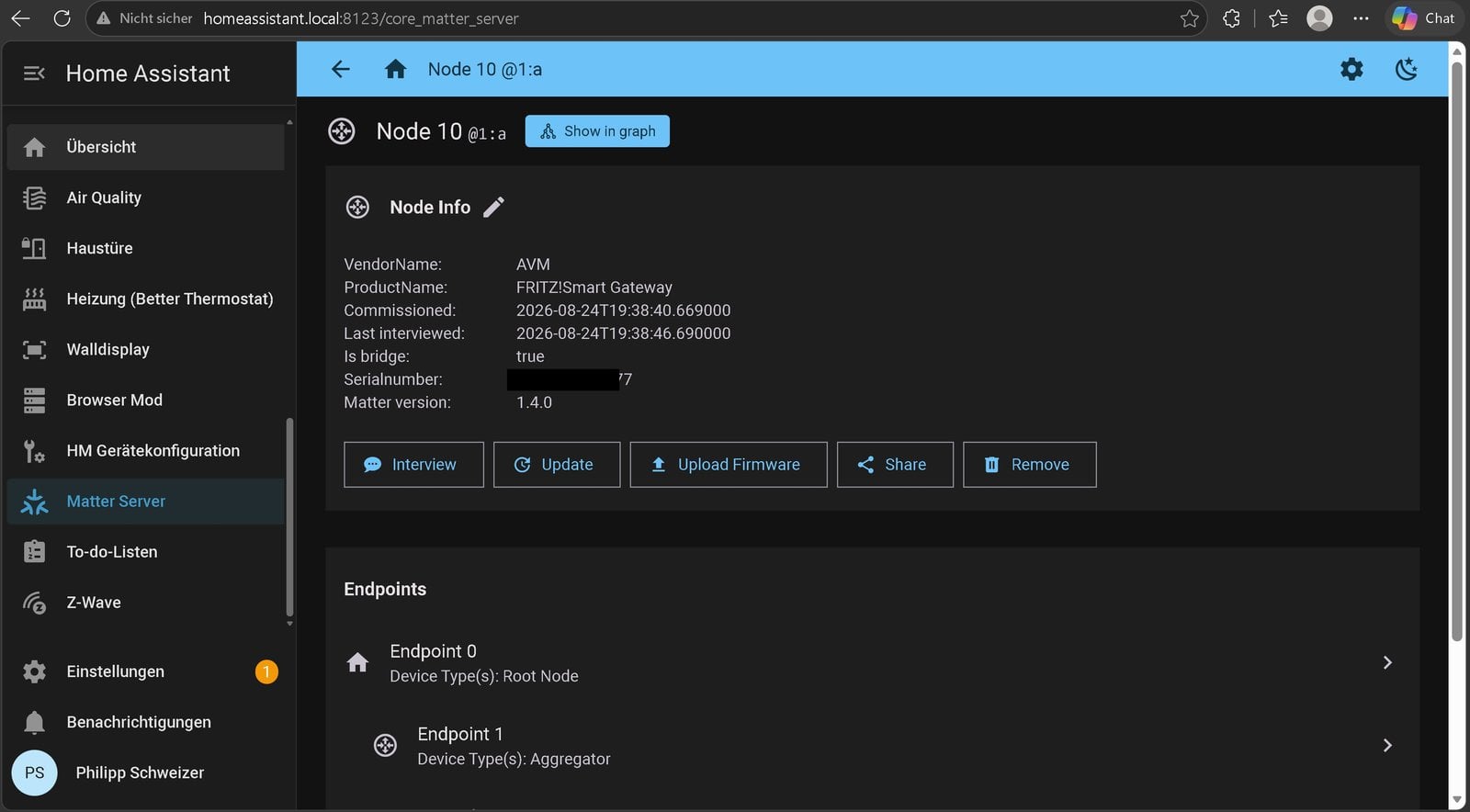
The gateway itself brings something that is completely missing via route 1: its own diagnostic values. Home Assistant shows hardware fault, radio module fault, network fault, uptime, number of reboots and reason for last reboot. Via the FRITZ!SmartHome integration, by contrast, the gateway is invisible – there you only see the devices attached to it.
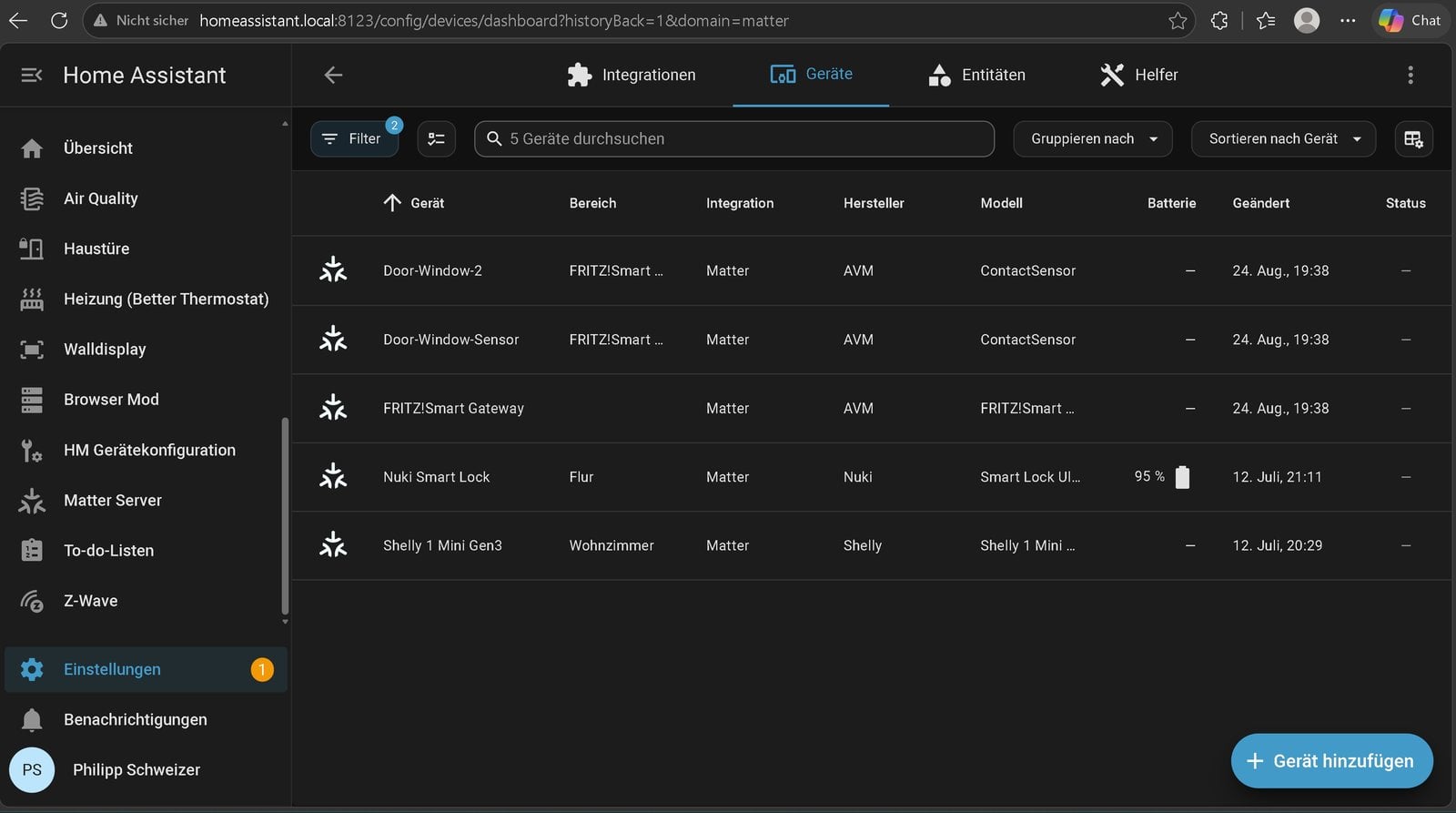
Two things do get lost along the way. The model name: the Zbeacon DS01 becomes a generic “ContactSensor” by “AVM” – the bridge only passes on the device type, not the make. That is down to the gateway, not Matter: Matter has fields for the vendor and product name of bridged devices. (The gateway reports the old company name itself: the Matter data still says AVM even though the manufacturer has been called FRITZ! since August 2025.) And the battery level: the device list has a column for it, my Nuki lock dutifully reports 95 per cent, and the two contacts behind the bridge report nothing (with the extra option above switched off). It is not just the display that is missing – there is no entity for it at all, not even a hidden one.
This is the one point where route 1 wins: the FRITZ!SmartHome integration does deliver the battery level as an entity of its own, the Matter bridge does not. So if you want a battery warning in Home Assistant for battery-powered sensors, you need the integration for it – on Matter alone you notice the flat cell only when the contact stops reporting.
The measurement: 30-second polling versus push
In short: in a side-by-side test on 24 August 2026, with one Zigbee door/window contact exposed to Home Assistant through both routes at once, the Matter bridge delivered all three state changes with their own timestamps, while the FRITZ!SmartHome integration recorded only one of them, 11.5 seconds later, and missed two entirely.
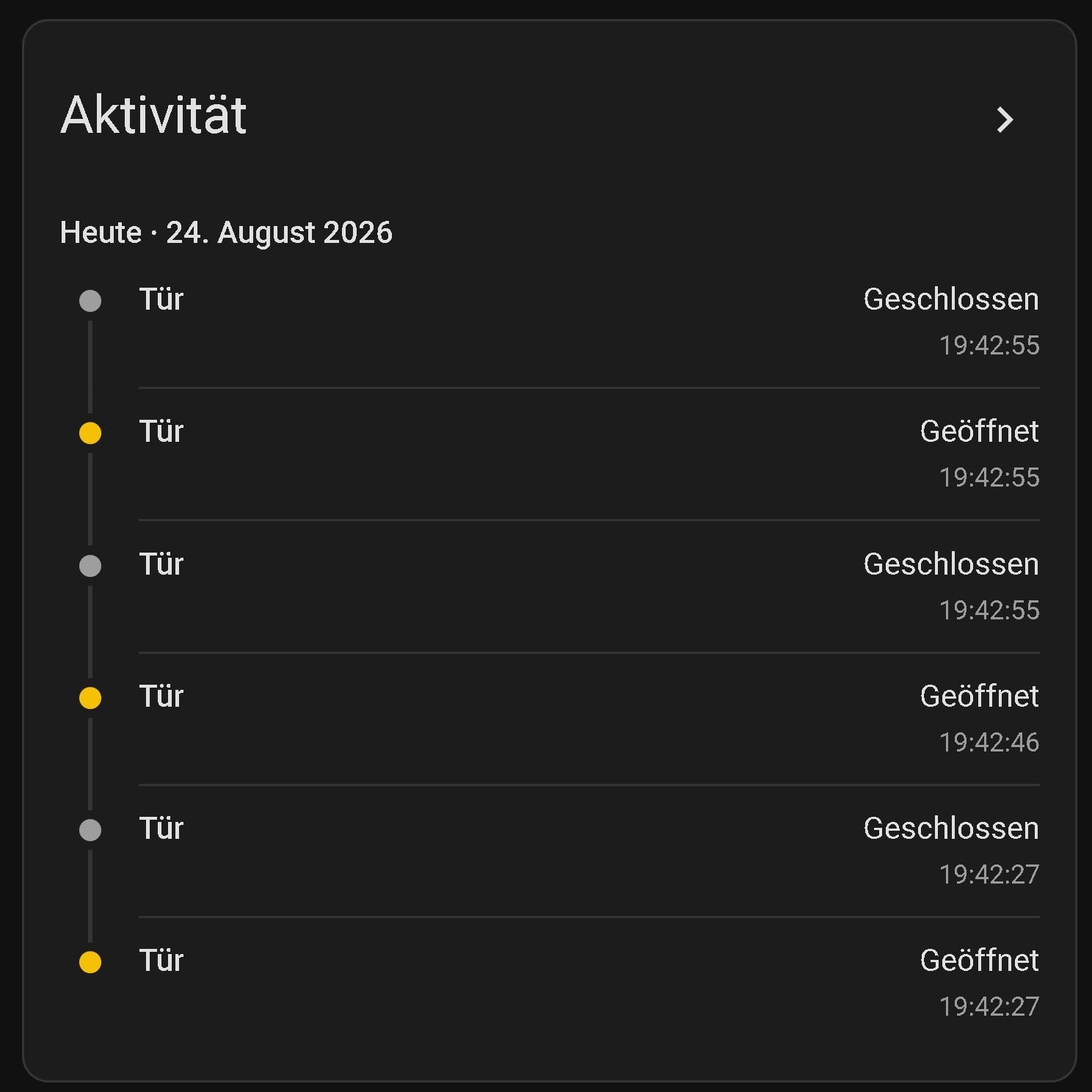
Now the question from the beginning can be answered cleanly: because both routes were running at the same time, the same physical sensor sat in Home Assistant twice – once via FRITZ!SmartHome, once via Matter. Same contact, same radio path, same second. One detail matters here: the sensor I measured is the one registered on the FRITZ!Box, which is exactly the case where the gateway has to learn the state over the internal FRITZ! mesh link first. So I opened and closed the door a few times:
| Time | Route | What arrived |
|---|---|---|
| 19:42:26.520 | Matter | closed |
| 19:42:38.018 | FRITZ!SmartHome | closed – the poll |
| 19:42:45.177 | Matter | open |
| 19:42:56.898 | Matter | closed |
| 19:43:08 | FRITZ!SmartHome | nothing – state unchanged |
First: Matter reports immediately, for devices on the box too. That answers the question FRITZ! documents nowhere: the internal mesh hop from the FRITZ!Box to the gateway does not slow things down. The timestamps land on arbitrary seconds and are accurate to the millisecond – no grid any more. The first change arrived via Matter 11.5 seconds earlier than via polling. Those 11.5 seconds are not a benchmark figure, though, they are chance: how long it takes depends on where in the 30-second window the change falls – anywhere between zero and thirty seconds. And not even the second is predictable: after a restart my grid shifted from :05/:35 to :08/:38. Only the interval is fixed, not the moment.
Second, and this is the more important point: polling never saw two of the changes at all. At 19:42:38 the contact was “closed”, and at the next poll at 19:43:08 it was “closed” again – in between it opened and closed. The history of the FRITZ!SmartHome entity contains nothing about it. Not late – missing altogether. That is the practical meaning of the phrase that polling captures states and not events: anything that happens between two polls and reverses itself is gone.
event entity in Home Assistant) – I have no suitable button here. That Matter delivers push is measured; that button presses come through is not proven by that, and those are two different things. Also unchecked: the energy data from FRITZ! smart plugs over Matter. According to FRITZ!, since FRITZ!OS 8.50 the gateway also passes the consumption readings of the FRITZ!Smart Energy 200, 210 and 250 to Matter networks, along with brightness readings.
What FRITZ!OS 8.26 adds
With gateway version 8.26 (April 2026) FRITZ! considerably expanded what the bridge can do. Alongside individual devices, the gateway has since also passed through:
- Groups – collections of similar devices (plugs and bulbs, or radiator controls and blinds). That lets Home Assistant switch several devices at once without you rebuilding anything there.
- Templates – can contain individual devices, groups and even FRITZ!Box convenience functions, such as toggling the guest Wi-Fi.
- Routines – your FRITZ! automations. For each one the bridge exports a Matter switch you can use to arm or mute the routine from Home Assistant.
- Support for illuminance measurement via Zigbee sensor and an extended compatibility list.
The routines part in particular is useful: if you have already built your automations in the FRITZ!Box, you do not have to reinvent them in Home Assistant – you can arm and mute them from there.
Route 1 or route 2? The direct comparison
| Criterion | FRITZ!SmartHome integration | Matter bridge |
|---|---|---|
| Hardware needed | the FRITZ!Box only | the gateway as well |
| Setup | very simple, user + password | a few more clicks, Matter server required |
| Updates | polled every 30 s | push, accurate to the second (measured) |
| Short changes between two polls | lost | delivered |
| Buttons as triggers | no (demonstrated) | per the standard yes |
| Battery level of sensors | as a per-cent sensor (after reloading the integration) | missing (extra option off) |
| Model name of the device | present | generic (“ContactSensor”) |
| Diagnostic values of the gateway | not visible | faults, uptime, reboots |
| Groups & templates | templates as buttons, routines as switches | from 8.26 groups, templates, routines |
| Energy data from smart plugs | extensive (current, voltage, power, energy) | consumption readings from 8.50 per FRITZ! |
| Depends on FRITZ!Box credentials | yes | no |
My recommendation after the test: if your FRITZ! devices only need switching and reading – plugs, radiator controls, blinds – the FRITZ!SmartHome integration is entirely sufficient. It costs nothing, is set up in five minutes and delivers the more detailed energy data on the plugs.
The moment sensors are supposed to trigger something, though, it tips over. The 30-second schedule is not the real problem – that is merely annoying. The problem is that short changes between two polls do not arrive, and I measured that above. An automation meant to react to a briefly opened window cannot be built reliably via route 1. Via Matter it can.
The setup this leads to: pair and name Zigbee devices on the FRITZ!Box, run the gateway as a pure Matter bridge — it does not need to manage a single bulb itself — and hang Home Assistant off it as the Matter controller. You do not have to move anything, and the device limit rises from 50 to 100 along the way.
On buttons I am more cautious than I would like to be: that route 1 rules them out is documented – there is no button press in the FRITZ! interface. That the Matter bridge passes them through cleanly is plausible and provided for in the Matter standard, but with no suitable device I did not see it myself. If that is your only reason for buying the gateway, you should know that.
Who is the gateway worth it for – and who not?
If you already run a Zigbee stick* on Home Assistant and have no FRITZ! smart home devices, you do not need the gateway. With ZHA or Zigbee2MQTT you get more devices, more control, real events and no vendor list limiting you. A second Zigbee network in the same frequency range can make an already crowded 2.4 GHz band worse.
One practical caveat before the list: this is DACH hardware. FRITZ! sells it primarily in Germany, Austria and Switzerland, the price is quoted in euros from the company’s own shop, and the plug is a European earthed type. If FRITZ!Box hardware is rare where you live, most of this article is background reading rather than a shopping recommendation.
The gateway does make sense in these cases:
- You have FRITZ! smart home devices and want them in Home Assistant – without a 30-second delay. Then the gateway is your route to Matter, even if your FRITZ!Box already has Zigbee built in. The one exception is the 5690 Pro, which according to FRITZ! has been a Matter bridge itself since FRITZ!OS 8.51.
- Your FRITZ!Box has no Zigbee of its own. Then you get Zigbee and Matter in one device.
- You are hitting the 50-device limit. A gateway or a second FRITZ!Box as a mesh repeater raises it to 100.
- Everyone in the household should be able to join in. The FRITZ!App Smart Home is more approachable for family members than a Home Assistant dashboard – and Home Assistant still hangs off it.
- You want to bring FRITZ! devices into other ecosystems – via Matter that also means Alexa, Apple Home or Google Home.
If you are planning a smart home with Home Assistant from scratch, a Thread border router plus a Zigbee coordinator* gives you more flexibility – and usually costs less.
Conclusion
Zigbee has arrived in the FRITZ! smart home, in two places: in current FRITZ!Box models such as the 6670 Cable and in the FRITZ!Smart Gateway. Registration is the same in both cases – button press, serial number or installation code – and the compatibility list is decently stocked by now – even if Zigbee door/window contacts still do not appear on it, mine ran without any fuss regardless. The only real day-to-day annoyance: freshly registered devices are called Zigbee #1 at first and want renaming by hand. Setting up the gateway together with the FRITZ!SmartHome integration takes just under half an hour – plug in the gateway, press Connect, pull the update, create a user in the FRITZ!Box, connect the integration.
The more interesting point, though: having Zigbee on board does not make a FRITZ!Box a Matter bridge. Today only the gateway fills that role, plus the FRITZ!Box 5690 Pro since FRITZ!OS 8.51. For Home Assistant users with any other box, the gateway is therefore less a Zigbee adapter than a Matter entry ticket – and that pays off even if your box has had Zigbee for ages.
Because polling every 30 seconds costs more than patience. I put both routes on the same sensor at the same time: over Matter all three state changes arrived accurate to the millisecond, over the FRITZ!SmartHome integration only one – the two short ones in between it never saw. So if you need sensors as triggers, there is hardly a way past the Matter bridge. The road there is needlessly rough, mind: Home Assistant rejects the gateway at first because it identifies itself with a development certificate (the bridge function is not certified yet, as FRITZ! confirmed), and the switch that fixes it relaxes validation for every Matter device at once. For around €70 it remains a fair bridge between two worlds – if you have FRITZ! devices and seriously want to use them in Home Assistant.
Not for Zigbee. Models such as the FRITZ!Box 6670 Cable, 7690 or 5690 Pro have a Zigbee base of their own, so you register your devices directly there. For Matter you usually do: according to the FRITZ! Matter overview, only the FRITZ!Smart Gateway and the FRITZ!Box 5690 Pro are currently Matter bridges, the 5690 Pro since FRITZ!OS 8.51 from 10 November 2026 (as of 18 November 2026). With any other box, you need the gateway for Matter.
No. According to the manuals the two are technically equivalent: Zigbee 3.0, a frequency range of 2400 to 2483 MHz, a maximum transmit power of 100 mW and up to 40 Zigbee devices each. The compatibility list and the registration methods are identical too. The gateway does not bring better Zigbee radio, it brings three other things: the Matter bridge, a rise in the total limit from 50 to 100 devices, and relief for the DECT side, because no cordless handsets share its radio. Devices on the gateway show up in the FRITZ!Box interface just as completely as the box’s own – only model name and battery level take a few hours to appear there.
There are three ways. The simplest is by button press: start pairing mode on the Zigbee device and press the Connect/WPS button on the FRITZ!Box. Philips Hue bulbs can alternatively be registered by their serial number, even while still attached to a Hue Bridge. Some devices, from Bosch for example, need an installation code together with the MAC address. The latter two run through the wizard under Smart Home → Geräte und Gruppen → Gerät anmelden (Devices and Groups → Register device).
That is normal. The FRITZ!Box does not give freshly registered third-party devices a meaningful name, it numbers them – my first Zigbee sensor was called Zigbee #1. So you have to rename the devices by hand. Pair them one at a time and remember the order. And rename them in the FRITZ!Box first, before Home Assistant picks them up, otherwise the placeholder sticks in the entity IDs.
No. FRITZ! states explicitly that the bridge passes through FRITZ!, HAN-FUN and Zigbee devices regardless of whether they are registered directly on the FRITZ!Box or on the gateway. Your existing devices stay where they are and still show up in the Matter network. I verified this: two sensors on two different bases both arrived in Home Assistant through the one bridge.
A maximum of 50 on the FRITZ!Box, with per-class limits: up to 20 FRITZ! smart plugs and LED bulbs, 40 Zigbee devices and 30 HAN-FUN devices. With a FRITZ!Smart Gateway or a second FRITZ!Box as a mesh repeater the limit rises to 100. HAN-FUN can run into restrictions if more than three cordless handsets or DECT door intercoms are attached to the box.
For Zigbee yes: at fritz.com/pages/zigbee FRITZ! maintains an official, regularly extended list of tested devices in seven categories. It applies equally to FRITZ!Box models with Zigbee and to the FRITZ!Smart Gateway. For DECT-ULE or HAN-FUN there is no list – the FRITZ! knowledge base only names examples such as the BoxCTRL roller shutter motors from Becker and the RolloTron pure DECT from Home Pilot. Which radio standard a device uses is often only stated in the manufacturer’s own documentation.
Yes. The FRITZ!SmartHome integration talks to the FRITZ!Box and receives all devices registered in the FRITZ! smart home through it, Zigbee included, whether they hang off the box or the gateway. Bulbs, plugs, thermostats, blinds and sensor values all arrive. Button presses from Zigbee buttons cannot be used as triggers this way, however, because the FRITZ!Box interface is only polled and reports no events.
The FRITZ! AHA interface is a pure request-response interface: Home Assistant fetches a snapshot of all devices, and the FRITZ!Box never reports anything of its own accord. The 30-second interval is hard-coded in the integration. For buttons a shorter interval does not help either: a button press is an event lasting milliseconds and leaves no state you could poll for, unlike a bulb or a temperature reading. The interval can be shortened via the system options and the homeassistant.update_entity action, which has a 10-second debounce – and it does not help with buttons at all.
Not for Home Assistant, as long as you use the FRITZ!SmartHome integration. On this route Home Assistant talks exclusively to the FRITZ!Box, never directly to the gateway. Devices on the gateway land in the same FRITZ! smart home and are polled through the same interface every 30 seconds. The gateway is not a second, faster wire into Home Assistant. Right after pairing, a device on the gateway shows up in the FRITZ!Box interface as just “Zigbee”; once the two bases have synced, the model name appears there too. Only when you add the gateway as a Matter bridge does the route change – communication then no longer runs through the FRITZ!Box interface. I measured this: a sensor on the gateway ran on the same 30-second cadence as one on the box, offset by a single second (:06 and :36 instead of :05 and :35). Two independent pollers, one interval.
No. The TR-064 service X_AVM-DE_Homeauto knows only five actions for querying and switching and can do less than AHA. UPnP eventing is switched off there: the service description at http://fritz.box:49000/x_homeautoSCPD.xml lists 36 state variables, all with sendEvents set to no. FRITZ! only has a real event interface for telephony, the call monitor on port 1012. Matter, by contrast, works with subscriptions: Home Assistant tells the bridge what it cares about and the bridge sends of its own accord. It is not that the gateway is faster – the protocol is a different one.
Yes, although FRITZ! officially documents only Amazon Alexa, Apple Home and Google Home. Home Assistant is a fully fledged Matter controller, and pairing runs through an ordinary Matter setup code, which the gateway shows under Smart Home → Geräte und Gruppen → Matter-Netzwerke (Devices and Groups → Matter networks). In Home Assistant the route goes through Settings, Apps, Matter Server, Open web UI and there Commission node, Commission existing device. The obvious route via the Matter page and Add device leads to a dead end, because the gateway is not a single device but a bridge. You also have to enable the Enable test-net DCL usage option in the Matter Server app configuration, otherwise Home Assistant rejects the gateway over its development certificate.
Because the gateway identifies itself with a test or development certificate instead of a production one. Home Assistant validates strictly by default and refuses it with the message TrustedAsTestCertificate. FRITZ! confirmed to me on request that the Matter bridge function is not certified yet, so the rejection is expected and not a fault in your setup. The fix is the Enable test-net DCL usage option in the Matter Server app configuration. Be aware that this relaxes certificate validation for every Matter device on that controller, not just the gateway – worth considering if you also run a door lock over Matter.
Yes, and measurably so. I ran both routes on the same physical sensor at the same time. Over Matter all three state changes arrived accurate to the millisecond; over the FRITZ!SmartHome integration only one of them did, and it was 11.5 seconds late. Two short changes in between were never recorded at all, because at the next poll the state was the same as before. That is the real difference: polling captures states, not events. How late a change arrives is chance, anywhere between zero and thirty seconds.
No, it has no Thread radio. The technical data lists Zigbee 3.0, DECT-ULE, LAN and 2.4 GHz Wi-Fi – the word Thread does not appear in the manual. Matter runs over IP, and the gateway is on the home network by cable or Wi-Fi anyway. That is also why the usual Bluetooth pairing via phone is not needed. Note that Matter does need IPv6 on your home network; the gateway node had no IPv4 address at all here.
No, in neither direction. The gateway is not a Thread border router, so Thread devices from Eve, Aqara or Nanoleaf cannot be run with it. And it is a Matter bridge, not a Matter controller: FRITZ! distinguishes the roles that way itself. A bridge takes devices with non-IP radio out into the Matter network, it does not pull third-party Matter devices in. So your FRITZ!, Zigbee and HAN-FUN devices go outwards, and nothing comes back the other way. In Home Assistant that fits well: Home Assistant is the controller, the gateway supplies it.
The FRITZ! Zigbee compatibility list only shows motion detectors, water detectors and temperature and humidity sensors under sensors (as of 24 August 2026) – Zigbee door and window contacts are missing from it. It works anyway: I registered a Zbeacon DS01 on the FRITZ!Box 6670 Cable, it reliably reports open and closed, and the FRITZ!Box even shows the battery level. The list is an inclusion list, not an exclusion criterion – unlisted devices can work, but FRITZ! does not guarantee it.
Only if you own FRITZ! smart home devices and want to bring them into Home Assistant over Matter. For Zigbee alone it is not worth it: with ZHA or Zigbee2MQTT you support considerably more devices, get events without delay and are not tied to a vendor approval list. A second Zigbee network in the same frequency range can make the radio situation worse.