Sonoff SNZB-02D & SNZB-02WD Review: Home Assistant Setup
Sonoff makes its Zigbee thermometer with a display in two versions: the Sonoff SNZB-02D for dry indoor rooms and the waterproof SNZB-02WD (IP65). I paired both with Home Assistant through ZHA, and the 02WD has been hanging in my garden since July 2026. This review covers which sensor belongs where, how to pair it, and why it sometimes reports less often than you might expect.
In short
The SNZB-02D is all you need for living spaces. For a bathroom, basement, greenhouse or a sheltered spot outdoors, get the SNZB-02WD.
- ZHA and Zigbee2MQTT need a Zigbee USB stick. Sonoff’s own bridges and the NSPanel Pro work with the eWeLink app, not as a coordinator for Home Assistant.
- How often new readings arrive depends on the integration, not just on the sensor.
- If the SNZB-02D seems frozen in Home Assistant, check the firmware first.
- Humidity can be a few percent off, and you can fix that with an offset.
Which sensor for which room?
Both sensors measure temperature and humidity and send their readings to your coordinator over Zigbee 3.0. What sets them apart is the housing, and that decides where you can put them. The figures in the table come from Sonoff.
| SNZB-02D | SNZB-02WD | |
|---|---|---|
| Where it goes | dry indoor rooms | bathroom, basement, greenhouse, sheltered spot outdoors |
| Housing | open | IP65, waterproof breathable membrane |
| Temperature range | −9.9 to 60 °C | −20 to 60 °C |
| Humidity range | 5 to 95 %, non-condensing | 0 to 100 % |
| Accuracy (manufacturer) | ±0.2 °C, ±2 % RH | ±0.2 °C, ±2 % RH |
| Comfort icons on the display | yes, adjustable thresholds | no |
| Battery | CR2450 | CR2477 |
| Mounting | magnetic wall mount with adhesive pad, or fold-out stand | hanging loop, magnetic according to Sonoff |
| Size | 59.5 × 62.5 × 18.5 mm | 62.8 × 58.5 × 21.8 mm |
| Where to buy | Sonoff SNZB-02D* | Sonoff SNZB-02WD* |
- Living room, bedroom, office: the SNZB-02D. It costs less and shows small icons when a room gets too warm, too cold, too dry or too humid.
- Bathroom, laundry room, damp basement: the SNZB-02WD. Its sealed housing copes with condensation and splashes.
- Greenhouse, covered balcony, garden shed: the SNZB-02WD, because it measures down to −20 °C. Keep it in the shade and out of the rain, though (see the box below).
- Aquarium, chest freezer, water temperature: the Sonoff SNZB-02LD*. It only measures temperature, but does so through a stainless steel probe on a 1.5 m cable, from −40 to 115 °C.
IP65 means splash-proof, not rain-proof
Sonoff itself says the SNZB-02WD should not be submerged, hit with water jets or placed outdoors where rain can reach it. In hard frost around −20 °C, temperature readings can drift by up to ±0.7 °C, and the battery loses a lot of capacity that it may not fully get back. A spot under a roof and in the shade is the way to go.
Looking for other Zigbee sensors, like motion detectors or door and window contacts? Our Zigbee sensor guide for Home Assistant has you covered.
Hardware and mounting
SNZB-02D
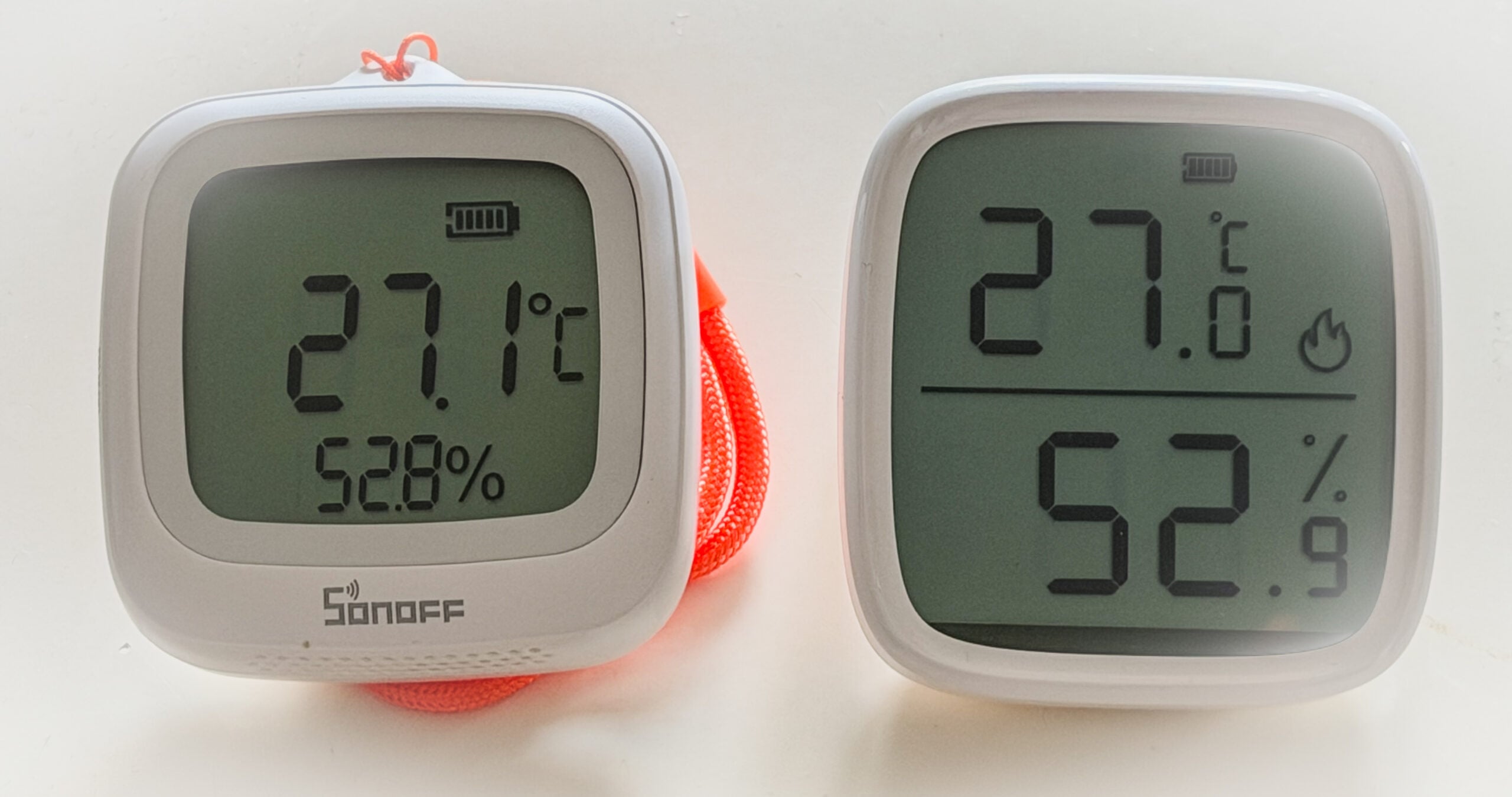
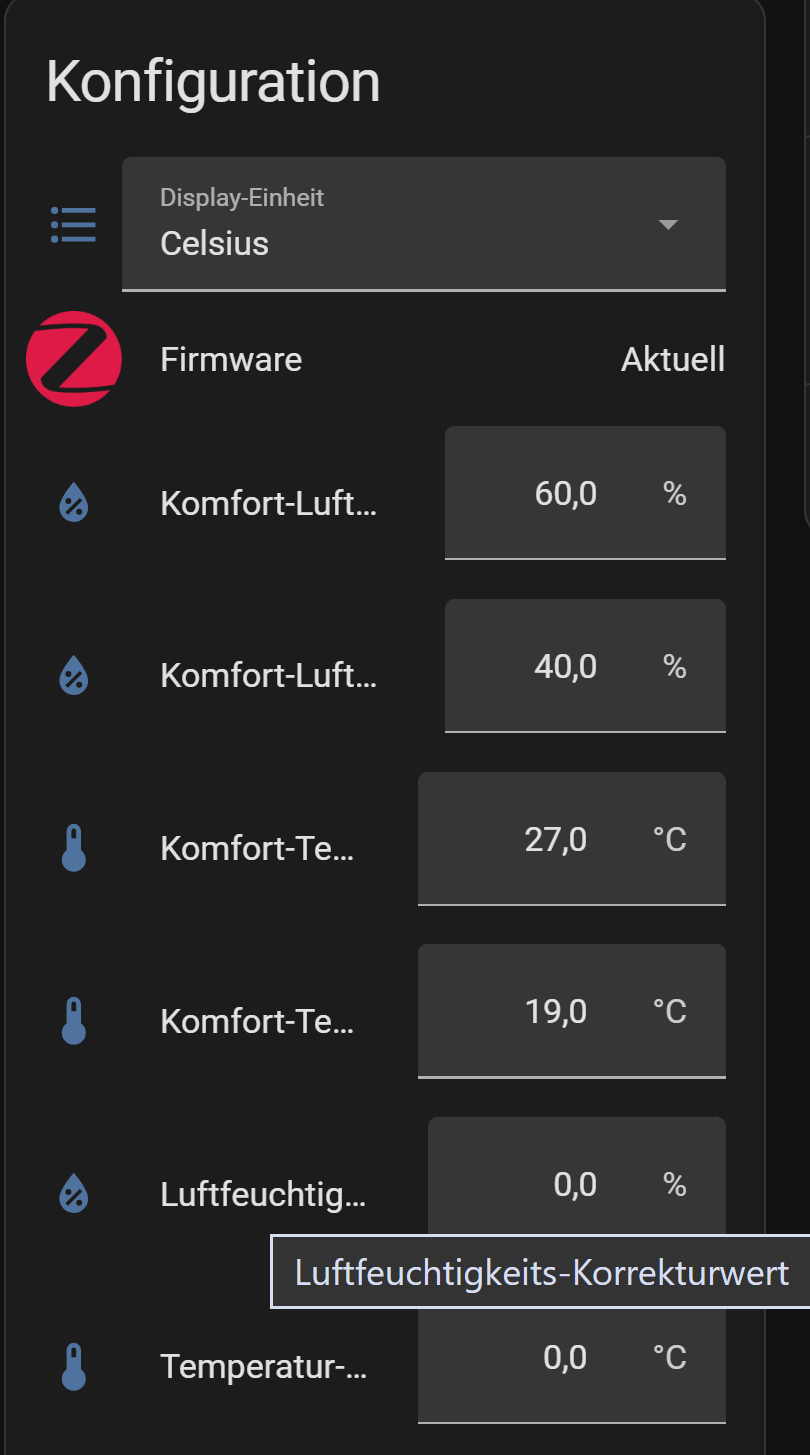
The SNZB-02D is the display version of the older SNZB-02. It snaps magnetically onto a mount that you stick to the wall with the included adhesive pad, or it stands on its own with a fold-out stand. The LCD shows temperature, humidity, battery level and four comfort icons. Out of the box, the flame appears at 27 °C and above, the snowflake at 19 °C and below, the sun at 40 % humidity or less and the droplet at 60 % or more. You can change these limits in Home Assistant.
The display reads well head-on but gets much harder to read from the side. The sensor feels well made, though it also costs more than basic Zigbee sensors without a screen.
SNZB-02WD
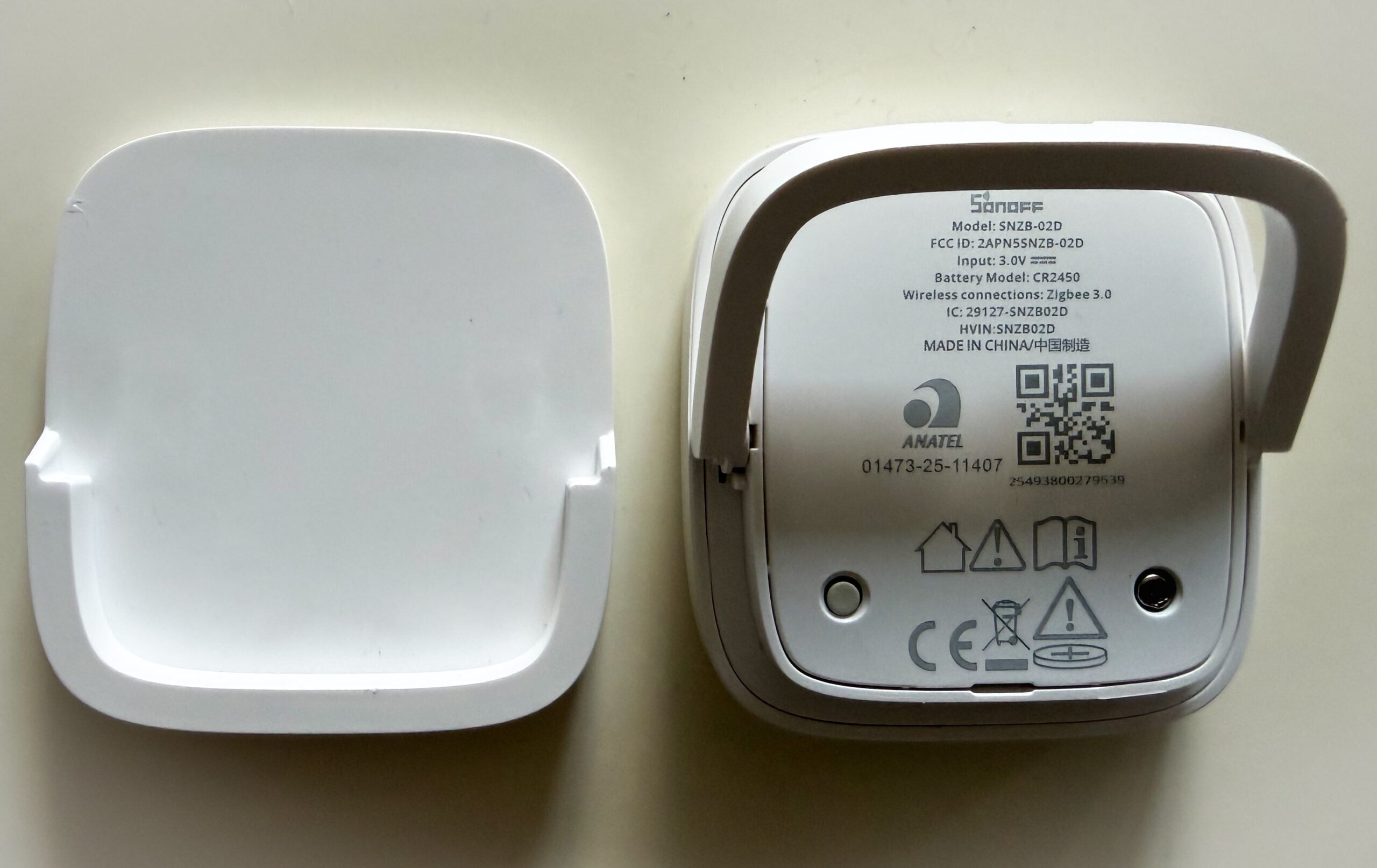
The SNZB-02WD has a similar housing, but it is fully sealed. A waterproof, breathable membrane lets air reach the sensor while keeping water out. I hung mine from the included lanyard. Sonoff says it also sticks to metal surfaces magnetically. Its rounded shape means it won’t really stand on its own. On its SNZB-02WD help page, Sonoff offers 3D-printable files for a desk stand and a suction-cup bathroom mount.
You open the battery cover by turning it with a coin. Use a small one: a 20-cent euro coin was too wide and left visible marks on mine.
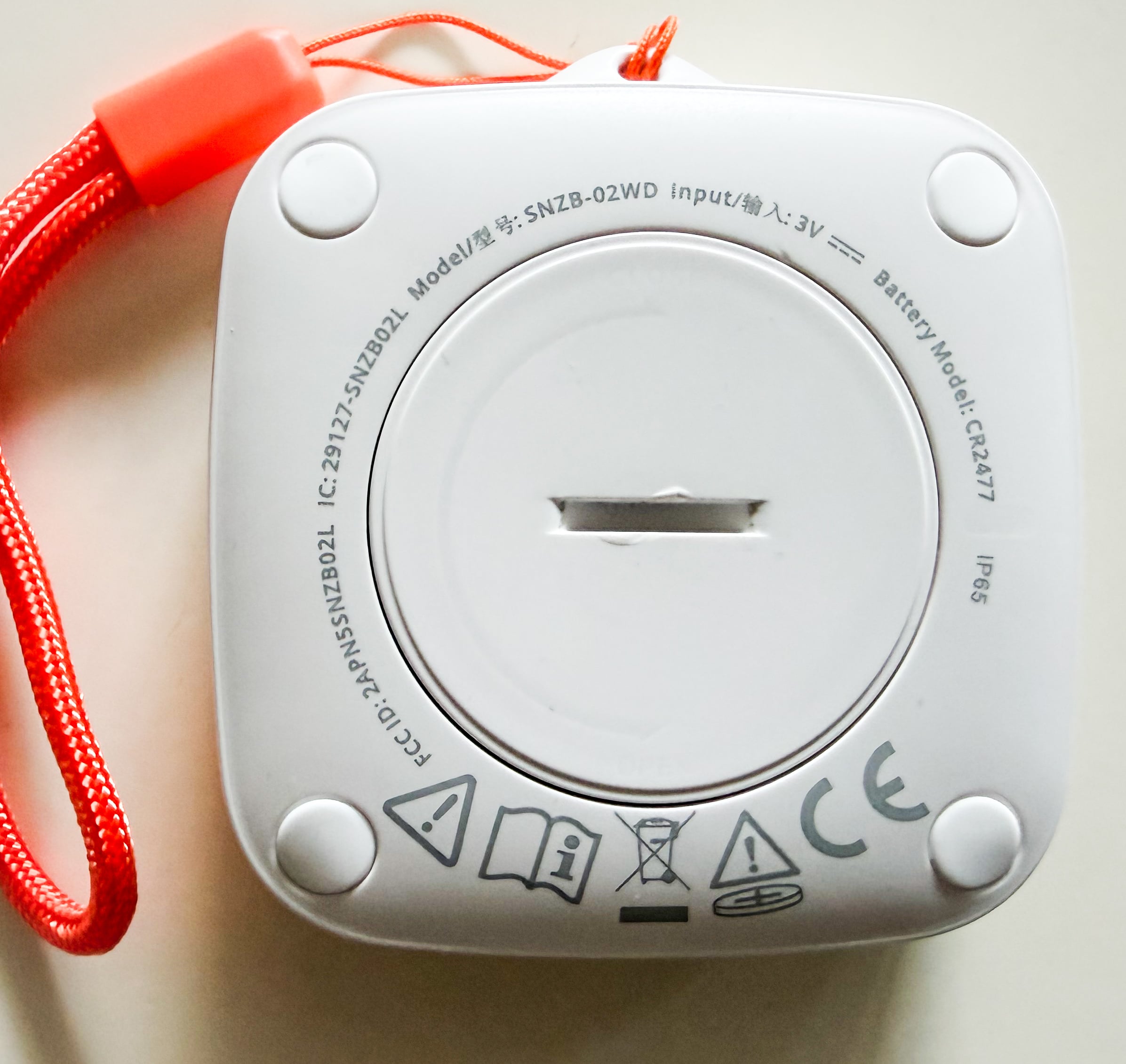
Battery life: Sonoff rates the SNZB-02WD at more than two years with default settings. Its current help page gives no figure for the SNZB-02D, while the reviews by CNX Software and SmartHomeScene both list about two years. Making the sensor report more often will shorten that.
What you need for Home Assistant
Both sensors are Zigbee-only, with no Wi-Fi. Home Assistant talks to them through its built-in Zigbee Home Automation (ZHA) integration or through Zigbee2MQTT. Either way, you need a Zigbee coordinator, which in practice means a radio stick plugged into your Home Assistant machine:
- Sonoff ZBDongle-E* – the one I use, on a USB extension cable
- Sonoff ZBDongle-P* – the version with a TI chip, which Sonoff also lists for ZHA and Zigbee2MQTT
- ConBee III* – the current stick from dresden elektronik, listed in the ZHA documentation
What won’t work: Sonoff’s own hubs, such as the Zigbee Bridge (ZBBridge-P/-U), the NSPanel Pro and the iHost. Sonoff’s compatibility list pairs them with the eWeLink app and names only the two ZBDongle sticks for Home Assistant via ZHA or Zigbee2MQTT. You can flash the original ZBBridge with Tasmota and use it as a network coordinator, but the ZHA documentation advises against coordinators that run over Wi-Fi.
ZHA or Zigbee2MQTT? The entities and offsets are the same. ZHA is already part of Home Assistant, and well-known sticks like the ZBDongle are usually detected as soon as you plug them in, with Home Assistant offering to set up the integration. Zigbee2MQTT runs as a separate app, but it lets you set how often the sensors report right in its interface. The two integrations also apply different default reporting settings (see the table further down). If the defaults are fine for you, ZHA does the job.
New to Zigbee sticks? Our guide on setting up Zigbee2MQTT walks you through it.
Pairing the sensor with Home Assistant
ZHA and Zigbee2MQTT both recognize the two models right away. The extras ZHA needs for these Sonoff sensors (offsets, comfort limits, display unit) already ship with Home Assistant, so there’s nothing to install.
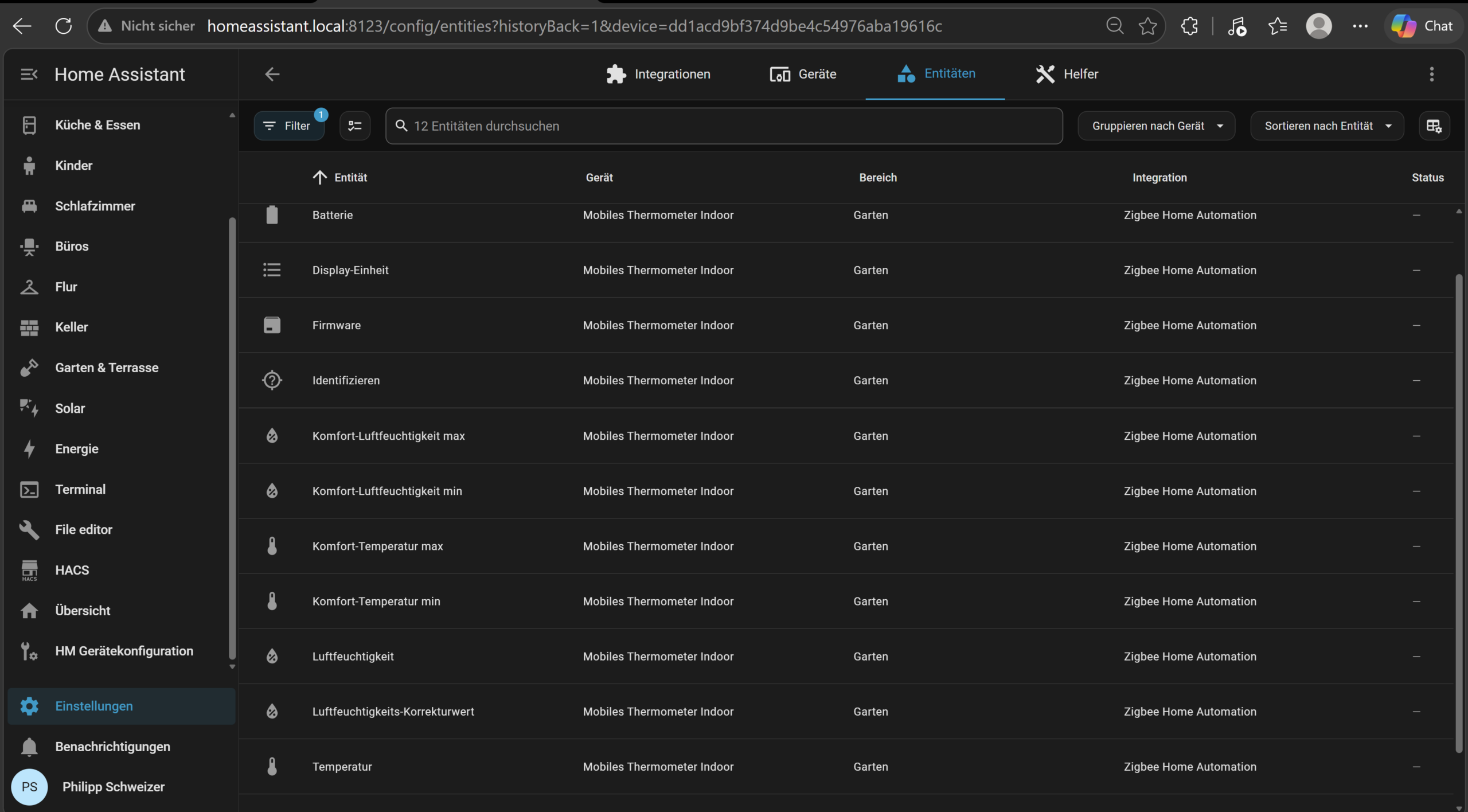
- Put Home Assistant into pairing mode. For ZHA, open Settings → Connectivity → Zigbee and click Add device in the bottom right corner. For Zigbee2MQTT, click Permit join in its interface.
- On a new sensor, pull the plastic tab out of the battery compartment first. A brand-new 02WD then enters pairing mode on its own. Otherwise, press and hold the button on the back with the included pin or a straightened paperclip for about five seconds, until the signal icon on the display blinks slowly. The sensor stays in pairing mode for three minutes. According to Sonoff, this long press also resets the SNZB-02WD to factory settings.
- Within a few seconds, the sensor shows up as a SONOFF
SNZB-02DorSNZB-02WD. - Give it a name like “Bathroom” or “Greenhouse” and assign it to an area.
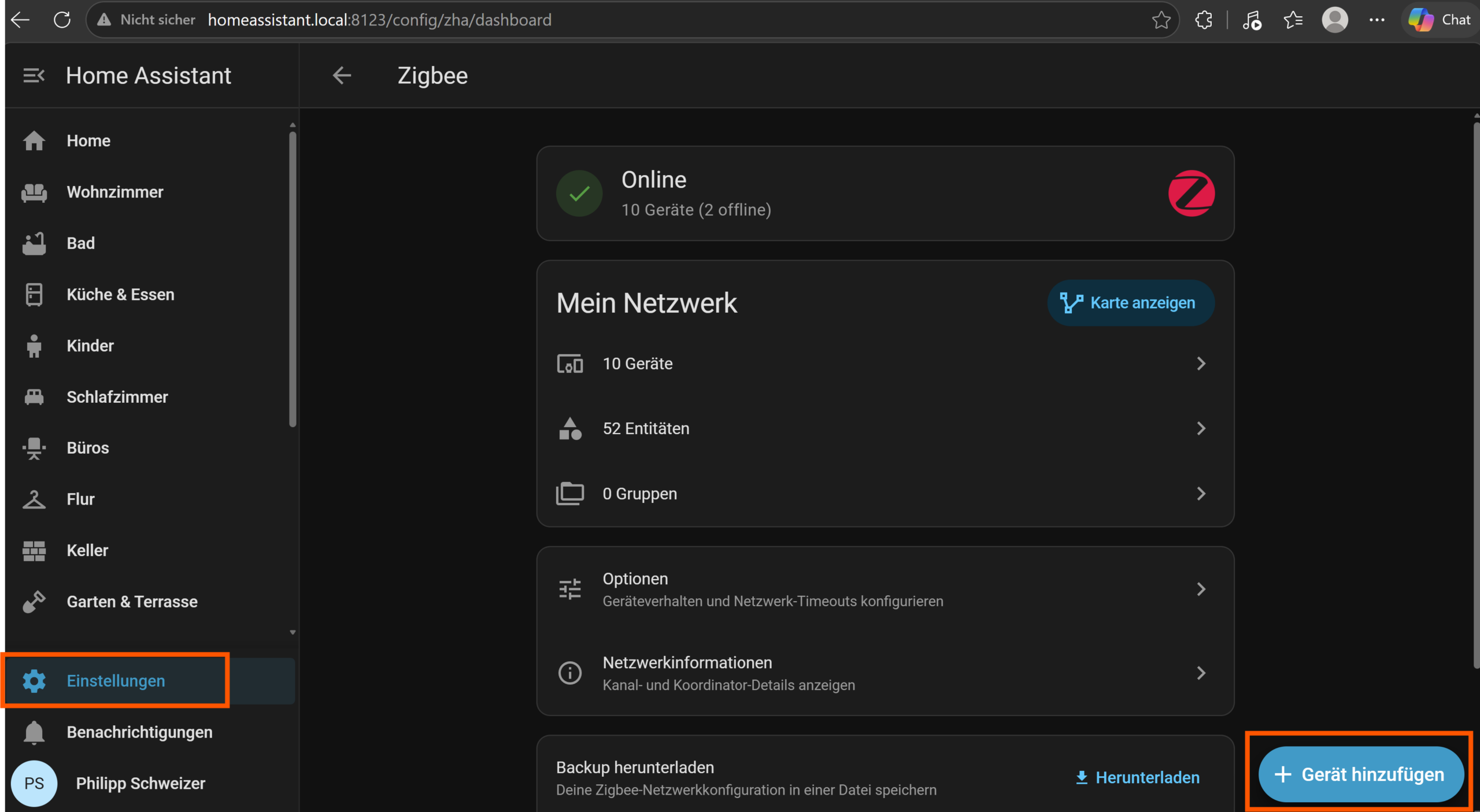
Which entities Home Assistant creates
- Temperature and humidity
- Battery level in percent
- Offsets for temperature and humidity
- Display unit (°C or °F)
- Firmware, as an update entity
- SNZB-02D only: comfort limits (minimum and maximum) for temperature and humidity, which drive the icons on the display
- Signal quality (LQI and RSSI), hidden by default
Updating the firmware
Firmware 2.3.0 is available for the SNZB-02D. According to its Zigbee2MQTT device page, it seems to improve data reporting, which is exactly what goes wrong when readings stop reaching Home Assistant. My SNZB-02D was already running this version during testing (firmware 0x00002300 in the screenshot) and kept delivering readings throughout. I haven’t updated one from an older version myself, so the steps below follow the Home Assistant, Zigbee2MQTT and Sonoff documentation.

- ZHA: firmware updates for Sonoff devices are switched on by default. When a new version is out, it shows up at the top of Settings and under “Firmware” on the device page, where you can install it.
- Zigbee2MQTT: go to the OTA page in its interface, check for updates and click the update icon next to the sensor (docs).
Battery-powered devices sleep most of the time, so press the button on the sensor briefly right before you start the update. If the battery is low, swap in a fresh one first. The firmware is sent over the air and can take a while. Sonoff walks through both routes with screenshots in its guide How to upgrade Zigbee firmware in ZHA and Z2M.

How often do the sensors report?
The display refreshes every few seconds. Home Assistant, however, only gets a new reading when a value changes by a set amount or a maximum interval runs out. For the SNZB-02D, Sonoff says it reports no more than once every 5 seconds when values change and at least once an hour when they don’t. The actual thresholds, though, are set by the integration when you pair the sensor:
| Integration | Temperature change | Humidity change | Maximum interval |
|---|---|---|---|
| ZHA (both models) | 0.5 °C | 1 % | 15 minutes |
| Zigbee2MQTT, SNZB-02D | 1 °C | 1 % | 1 hour |
| Zigbee2MQTT, SNZB-02WD | 0.2 °C | 1 % | 1 hour |
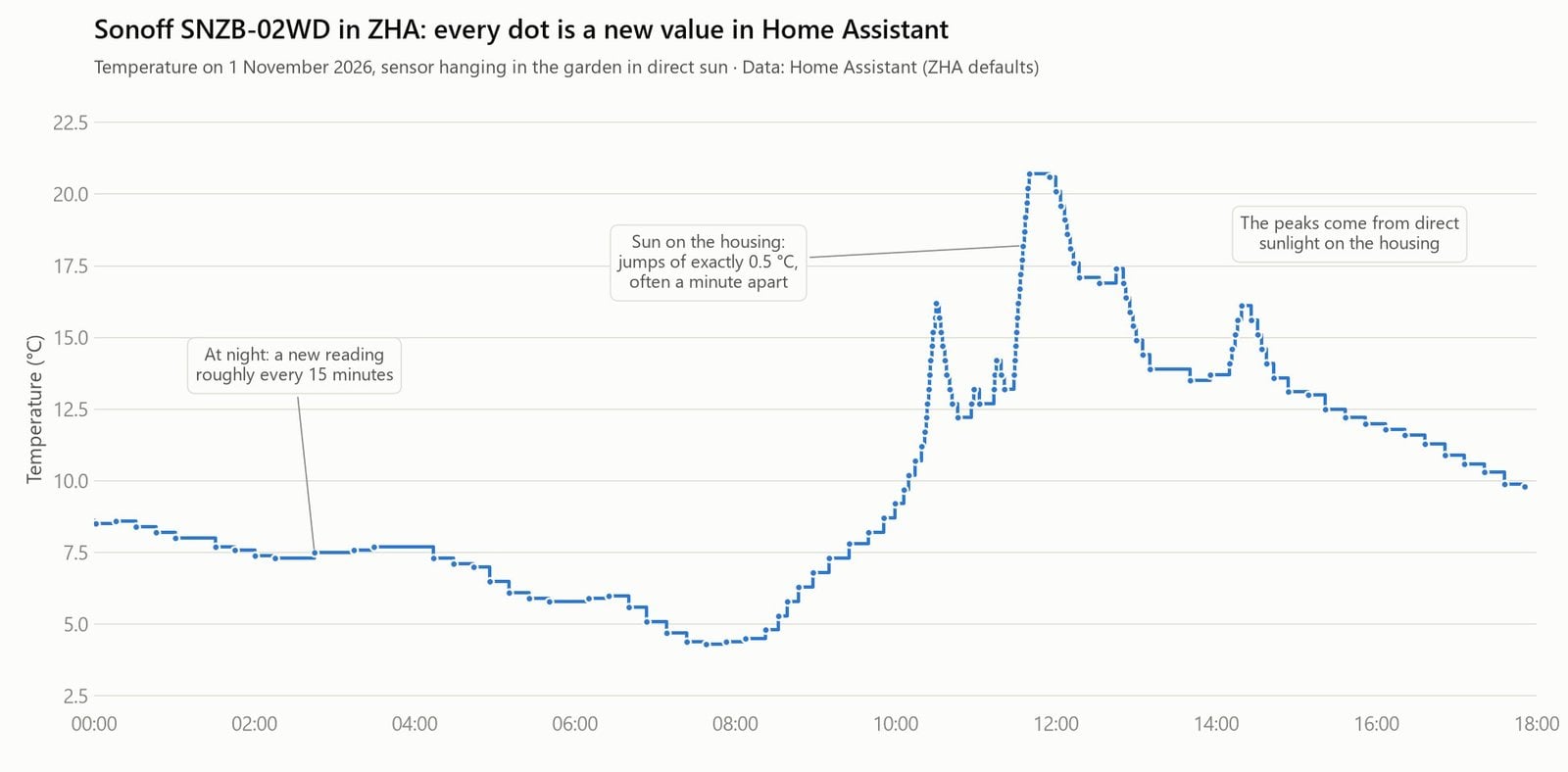
These values come from the ZHA source code and the Zigbee2MQTT device definitions (as of November 2026). My SNZB-02WD on ZHA behaves exactly like that: when the temperature changes quickly, the value moves in steps of 0.5 °C, and otherwise a new reading arrives about every 15 minutes.
Watch out for the 1 °C threshold if you run the SNZB-02D on Zigbee2MQTT. When a room warms up or cools down slowly, Home Assistant may only see a new value once an hour, even though the display has long since moved on. That looks a lot like a frozen sensor.
Changing how often they report
- Zigbee2MQTT: press the button on the sensor first to wake it up. Then open the device and go to the Reporting tab. For temperature (cluster
msTemperatureMeasurement), you could enter 10 for Min rep interval, 900 for Max rep interval and 20 for Min rep change. That last value is in hundredths of a degree, so 20 means 0.2 °C. - ZHA: there’s no setting for this in the interface. “Reconfigure” on the device page only reapplies the defaults. For other thresholds you need the zha-toolkit integration and its
conf_reportcommand.
The more often a sensor transmits, the sooner its battery runs flat. For heating and ventilation automations, the ZHA defaults are usually plenty.
How accurate are they?
Sonoff specifies ±0.2 °C and ±2 % relative humidity for both models. I didn’t run my own comparison against a reference instrument. There are two independent tests of the SNZB-02D:
- SmartHomeScene ran it for five days next to a calibrated Xiaomi sensor (LYWSD02). Temperature tracked the reference very closely, while humidity read 6 to 7 % lower. With a correction of about 5 %, the curves lined up.
- CNX Software compared it with the same Xiaomi model over three days and found both readings fairly accurate, with small differences you can calibrate out.
I couldn’t find an independent accuracy test of the SNZB-02WD. If your sensor disagrees with a thermometer or hygrometer you trust, enter the difference as an offset: in ZHA under Configuration on the device page, in Zigbee2MQTT under Settings (specific) as temperature_calibration and humidity_calibration.
Keep it out of the sun
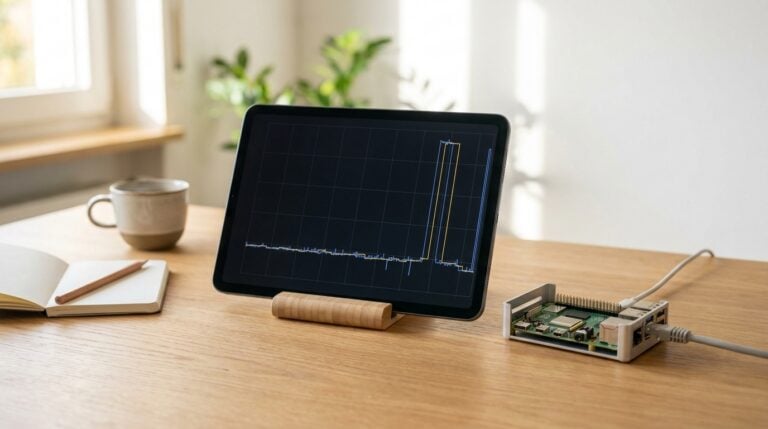
My own setup shows how not to do it: my SNZB-02WD hangs in a spot in the garden that gets morning sun. On 1 November, its reading climbed from 4.3 °C in the early morning to 20.7 °C within four hours (see the chart above). The housing heats up in direct sunlight, so those numbers are no good as an outdoor temperature. If you’re mounting one outside, pick a shaded spot that stays dry, ideally a north-facing wall or a small radiation shield.
When the SNZB-02D stops sending readings
This comes up again and again in the Home Assistant community: the SNZB-02D shows current values on its display, but the entity in Home Assistant is stuck on an old one. Work through these steps in order:
- Check the firmware: if the device page shows anything older than 2.3.0 (0x00002300), install the update as described above.
- Check the reporting threshold: on Zigbee2MQTT, the 02D only reports after a 1 °C change or after an hour by default. Lower the threshold in the Reporting tab. On ZHA, press the button on the sensor and click “Reconfigure” on the device page. That sends the default reporting settings to the sensor again, which helps if they didn’t make it across during pairing.
- Re-pair it: remove the device from Home Assistant and pair it again. For Zigbee2MQTT, the docs recommend force-removing the device, restarting Zigbee2MQTT and then pairing it again. If it won’t pair, take the battery out for ten seconds.
- Improve the radio link: if the Zigbee stick is plugged straight into the computer, especially next to a USB 3 port, put it on a USB extension cable. Sonoff gives 50 meters through walls between sensor and coordinator as a rough upper limit. A cheap Zigbee router, such as an ESP32-C6 set up as a Zigbee router, fills in the gaps.
Verdict
For dry living spaces, the SNZB-02D is the easy pick. For a bathroom, basement, greenhouse or a sheltered spot outdoors, go with the SNZB-02WD. Both work with ZHA and Zigbee2MQTT through a Zigbee stick, locally and without a cloud account. Expect to apply a humidity offset, and keep the 02WD out of the sun and rain. If the 02D stops updating in Home Assistant, current firmware and a sensible reporting threshold usually sort it out.
Yes. Both models are Zigbee-only, with no Wi-Fi. For Home Assistant you need a Zigbee USB stick such as the Sonoff ZBDongle-E or -P, or a ConBee III. Sonoff’s Zigbee Bridge, NSPanel Pro and iHost work with the eWeLink app and not as a coordinator for ZHA or Zigbee2MQTT.
Yes. With ZHA or Zigbee2MQTT, everything runs locally through your Zigbee stick. You don’t need an eWeLink account or an internet connection.
Sonoff rates the SNZB-02WD and its CR2477 at more than two years with default settings. Reviews list about two years for the SNZB-02D with its CR2450. More frequent reporting shortens battery life.
Yes, as long as it’s sheltered. IP65 protects against splashes, but Sonoff advises against placing it where rain can reach it. In hard frost, readings drift more and the battery suffers. Direct sunlight heats up the housing and skews the readings.
The SNZB-02DR2 is a separate model. According to the Zigbee2MQTT docs, it can also show readings from up to two other sensors on its display, such as the outdoor temperature. As a plain room thermometer, the SNZB-02D is all you need.