
Raspberry Pi 5 vs. N100 Mini PC: Which One Should You Buy? The Big 2026 Comparison
Raspberry Pi 5 vs. N100 mini PC – if you are planning an efficient home server in 2026, this is the question. Whether it is for Home Assistant, Docker containers, a small NAS replacement or a media server: both systems compete for the same spot in your server rack. And the market has shifted massively – while the Raspberry Pi 5 has become significantly more expensive due to the RAM price crisis, Intel N100 and N150 mini PCs are pushing into homes as fully equipped systems.
In this comparison we look at both platforms down to the chip level: current benchmarks, measured power consumption, honest total costs and a clear recommendation for every use case – from smart home and Frigate cameras to electronics projects on the GPIO pins.
In short
An Intel N100/N150 mini PC is faster than the Raspberry Pi 5 in almost every discipline – including single-core – and already ships with a case, RAM, SSD and power supply.
- For the mini PC: if you run IP cameras (Frigate), media servers or several VMs under Proxmox – QuickSync is the game changer.
- For the Pi 5: if you tinker and want maximum efficiency – lowest power draw, silent passive operation and the GPIO pins for electronics projects.
- Only buying the board pays off for the Pi mainly if you already own a power supply, case and storage.
The Contenders: ARM Board vs. x86 Complete System
The Raspberry Pi 5 is a single-board computer built around the Broadcom BCM2712 (4× Cortex-A76, 2.4 GHz). You buy the bare board and add power supply, case, cooler and storage yourself – that makes it flexible, but it is also a DIY kit.

An N100/N150 mini PC, on the other hand, is a finished x86 computer: Intel processor from the Alder Lake-N or Twin Lake generation, 16 GB RAM, NVMe SSD, case, fan and power supply included – unbox, plug in, done. Which Intel CPU is the right one is covered in detail in our mini PC comparison N100 vs. N150 vs. N350.
Technical Architecture Compared
| Feature | Raspberry Pi 5 | Intel N100/N150 mini PC |
|---|---|---|
| Architecture | ARMv8.2-A (4× Cortex-A76, 2.4 GHz) | x86-64 (4× Gracemont, up to 3.4/3.6 GHz) |
| RAM | 4/8/16 GB LPDDR4X (soldered) | 16 GB DDR4/DDR5 (module, usually upgradeable) |
| Storage | microSD; NVMe only via M.2 HAT | M.2 NVMe slot onboard, often + SATA |
| PCIe | 1× PCIe 2.0 (unofficially 3.0) | up to 9 PCIe 3.0 lanes |
| Video engine | HEVC decoder only, no encoder | Intel QuickSync (H.264/H.265/AV1) |
| Encryption | ARM Crypto Extensions | Intel AES-NI |
| GPIO/tinkering | 40-pin header, HATs, camera ports | no GPIO pins |
| Operating system | Raspberry Pi OS, HAOS, Ubuntu (ARM64) | Windows 11, Proxmox, HAOS, any x86 Linux |
Benchmarks 2026: Passmark & Geekbench 6
Time to bust a stubborn myth: the Raspberry Pi 5 is not the single-core king. The current numbers (as of July 2026) show the Intel chips ahead in both disciplines:
| System | Passmark (multi) | Passmark (single) | Geekbench 6 (single/multi) |
|---|---|---|---|
| Raspberry Pi 5 (BCM2712) | ~4,400 | ~1,800 | ~900 / ~2,150 |
| Intel N100 | ~5,300 | ~1,900 | ~1,200 / ~3,100 |
| Intel N150 | ~5,400 | ~1,900 | ~1,250 / ~3,200 |
Context: In Passmark multithread the N100 leads the Pi 5 by around 20 percent, in Geekbench 6 it is 30 to 45 percent – and even in single-core Intel is slightly ahead (sources: PassMark database, Geekbench measurements by Jeff Geerling, both July 2026). The N150 is only a mild refresh of the N100: not worth upgrading to if you already own an N100 – when buying new, simply take whichever is cheaper.
Important for real life: benchmarks are not everything. For a purely sensor-based smart home the Pi 5 is more than fast enough – you only feel the difference with video streams, large databases and virtualization.
The Killer Feature: Intel QuickSync for Video & AI
The biggest functional difference sits in the graphics unit. All N-series CPUs include Intel QuickSync – a dedicated hardware engine for video encoding and decoding (H.264, H.265, even AV1).
- N100/N150: Several 4K camera streams (e.g. in Frigate) or Plex/Jellyfin transcodes run in hardware – CPU load stays below 20 percent.
- Raspberry Pi 5: There is only an HEVC decoder and no hardware encoder – transcoding and AI object detection run on the CPU. More than two camera streams is the limit, and without extra hardware like the Raspberry Pi AI HAT+ or a Google Coral it gets tight.
Rule of thumb: As soon as IP cameras with object detection or a media server with transcoding are involved, there is practically no way around the mini PC.
Power Consumption & Running Costs: The Pi Stays Efficiency King
When it comes to power draw, the Pi 5 turns the tables. The measurements (taken at the wall):
| System | Idle | Full load | Power cost/year (24/7)* |
|---|---|---|---|
| Raspberry Pi 5 | ~2.8 W | ~9.7 W | approx. €11 |
| N100/N150 mini PC | ~6–8 W | ~25–30 W | approx. €25 |
*Assumption: €0.35/kWh (German household rate), typical home server mix of mostly idle with occasional load (Pi 5 avg. ~3.5 W, N100 avg. ~8 W). Pi 5 measurements: Jeff Geerling (sbc-reviews); N100: typical vendor figures and community measurements depending on model and BIOS settings.
The difference of roughly €14 per year sounds like an argument for the Pi at first – but over three years that is only about €40. That alone does not decide the duel, especially since the mini PC delivers considerably more performance for it.
Purchase Costs 2026: The RAM Crisis Shifts the Duel
For years the knockout argument was: “The Pi is so much cheaper.” In 2026 that is no longer true. Exploding memory prices – we explain why in our article on the AI boom and Pi prices – mean the Raspberry Pi 5 8GB board alone currently costs around €185 at specialist retailers. Let’s do the honest math (as of July 2026):
| Setup | Components | Total price |
|---|---|---|
| Pi 5 (8 GB), SD base | board* + 27 W PSU* + case with cooler + microSD | approx. €225 |
| Pi 5 (8 GB), NVMe setup | as above + M.2 HAT + 256 GB SSD | approx. €270–300 |
| NiPoGi AK2 Plus (N100)* | complete: 16 GB RAM, 512 GB NVMe, Windows 11 | approx. €240 |
| Beelink Mini S13 (N150)* | complete: 16 GB RAM, 500 GB NVMe, Windows 11 | approx. €340 |
An N100 complete system with twice the RAM and a fast SSD now costs practically the same as a comparably equipped Pi 5 setup. The Raspberry Pi’s price advantage has melted away – it only remains a buying argument for the entry-level 4 GB model or if you already own a power supply and case.
Which One for What? The Use Case Matrix
| Use case | Recommendation | Why |
|---|---|---|
| Home Assistant (sensors/actuators only) | Either, Pi 5 is enough | HAOS is bored on both systems |
| Home Assistant + Frigate/cameras | N100/N150 | QuickSync decodes streams in hardware |
| Proxmox with several VMs | N100/N150 | x86 virtualization, more RAM, better image support |
| NAS replacement / Nextcloud | N100/N150 | native NVMe/SATA, AES-NI for HTTPS |
| Plex / Jellyfin | N100/N150 | hardware transcoding for several clients |
| Pi-hole / AdGuard / WireGuard | Pi 5 (or Pi 4/Zero 2) | minimal power draw, task needs little compute |
| Electronics projects (GPIO, HATs, camera) | Raspberry Pi 5 | 40-pin header and CSI ports exist only here |
| Silent 24/7 operation in living spaces | Pi 5 passive or fanless mini PC | a Pi 5 in a passive case is silent; a mini PC needs a 0 dB model |
| Frugal desktop replacement | N100/N150 | Windows 11 preinstalled, smooth x86 browsing |
Home Assistant in Detail: Proxmox, RAM and Encryption
Since most of you are reading this because of Home Assistant, the three most important practical points:
1. Virtualization: The big advantage of the x86 platform is Proxmox as the foundation: Home Assistant OS runs cleanly isolated in a VM, with Plex, Pi-hole or Nextcloud in their own containers next to it. It is possible on the Pi 5 – as our guide to Proxmox on the Raspberry Pi 5 shows – but the ARM ports are more experimental and many Docker images simply run smoother on x86-64.
2. RAM: 8 GB is plenty for Home Assistant OS “bare metal”. For Proxmox with several VMs, the 16 GB that mini PCs ship with as standard are the decisive buffer – on the Pi 5 the 16 GB variant currently costs over €300.
3. Encryption: HTTPS, VPN (WireGuard) and backups benefit from Intel’s AES-NI instruction set. The Pi 5 has caught up strongly with the ARM Crypto Extensions, but does not reach the throughput of the Intel platform.
By the way: if you want a ready-made plug-and-play device without any tinkering, also take a look at the Home Assistant Green – often the most relaxed solution for a pure smart home hub.
Storage: Retrofitting NVMe vs. Built In
The days of running Home Assistant from a fragile SD card are over – both systems can do NVMe. The difference is the effort: on the Pi 5 you need an additional M.2 HAT on the single PCIe lane (our NVMe buying guide for the Pi 5 tells you which one is worth it). On the mini PC the NVMe SSD sits on the mainboard from the factory, connected via several PCIe 3.0 lanes – ideal for the Home Assistant database (recorder) or a Nextcloud.
Our Hardware Recommendations 2026
Raspberry Pi 5 (8 GB) – for Makers and Efficiency Fans
The 8 GB model is the sweet spot: enough RAM for Home Assistant and its apps (formerly add-ons), full GPIO flexibility and completely silent in a passive case. Add the official 27 W power supply* and a suitable case.
NiPoGi AK2 Plus (N100) – the Value Champion

For around €240 you get the all-inclusive package: N100, 16 GB RAM, 512 GB NVMe and a Windows 11 license (which you simply overwrite for Proxmox). Extremely widespread in the community and correspondingly well documented.
Hard to find right now (as of November 2026): The AK2 Plus is currently out of stock on Amazon. If you don’t want to wait, go for the Beelink Mini S12 Pro* instead: same N100, 16 GB of RAM and a 500 GB SSD, so it’s just as capable for Home Assistant and Proxmox.
Beelink Mini S13 (N150) – the Solid All-Rounder

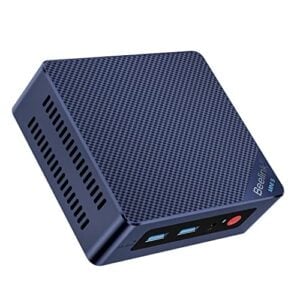
Beelink’s S series has been the standard home server recommendation for years. The Mini S13 brings the current N150, 16 GB RAM and a 500 GB SSD, runs whisper-quiet and is excellently documented when it comes to Proxmox setups.
MINIX Z150-0dB (N150) – the Silent Premium Pick

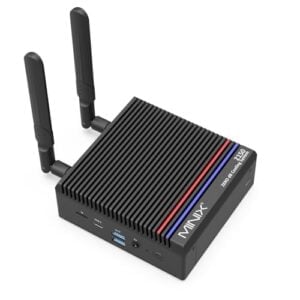
The one point where a passively cooled Pi 5 usually wins is noise – the Z150-0dB counters with a completely fanless design: N150, 16 GB RAM, 512 GB SSD and zero decibels. MINIX does charge a significant premium for it, though.
The recommendations from this comparison
Four ways to a home server – from maker board to silent complete system. Where Amazon.com has a product in stock, the box shows its live price in US dollars.
Verdict: Which System Should You Buy?
Get the Raspberry Pi 5 if …
- you need the GPIO pins, camera ports or HATs for electronics projects – no mini PC can do that.
- your server only runs light services (Pi-hole, WireGuard, sensor-based smart home) and every watt counts.
- you already own a power supply, case and storage and only need the board.
👉 Still unsure which Pi model fits? Check our Raspberry Pi buying guide 2026.
Get the N100/N150 mini PC if …
- IP cameras with object detection (Frigate), Plex/Jellyfin or large databases are involved – QuickSync is the game changer.
- you want to run several services and VMs in parallel under Proxmox.
- you want a complete system without the accessory puzzle – at today’s Pi prices it simply offers more for the money.
FAQ: Raspberry Pi 5 vs. N100
Yes. In Passmark multithread the N100 leads the Pi 5 by around 20 percent, in Geekbench 6 by 30 to 45 percent – and even in single-core the Intel chip is slightly ahead. The Pi 5 clearly wins on power consumption and efficiency per watt.
Typical N100/N150 mini PCs draw about 6 to 8 watts at idle and 25 to 30 watts under full load. Running 24/7 as a home server that adds up to roughly €25 in electricity per year (at €0.35/kWh) – about €14 more than a Raspberry Pi 5.
The AI boom has sent LPDDR4X memory prices through the roof, and the RAM is soldered onto the Pi. The 8 GB board therefore currently costs around €185, the 16 GB variant over €300. That has largely erased the classic price advantage over mini PCs.
Not directly. Mini PCs have no GPIO pins. If you want to connect sensors or relays you need workarounds via USB adapters (e.g. FT232H) or you offload the electronics to ESP32 boards running ESPHome. For classic maker projects with HATs and camera modules the Pi remains unmatched.
Yes. Thanks to Intel QuickSync the N100 decodes several 4K streams in hardware while CPU load stays below 20 percent. On the Raspberry Pi 5, without extra hardware like a Google Coral or the Raspberry Pi AI HAT+, two cameras is the limit.
Next Steps: Installation
Whatever hardware ends up in your server rack – thanks to Home Assistant OS, installation is easier than ever:
👉 Install Home Assistant on the Raspberry Pi: The Complete Guide
👉 Install Home Assistant OS on a Mini PC
👉 Install Proxmox VE – Including on the Pi 5
Tip: If you would rather stay with the compact ARM architecture after all, take a look at our Raspberry Pi alternatives comparison 2026 – you will also find powerful options like the Orange Pi 5 there.
And once you have decided? We have a dedicated installation guide for each platform: Raspberry Pi, mini PC with Proxmox, QNAP NAS and UGREEN NAS — all collected in our Home Assistant overview.